The quick answer
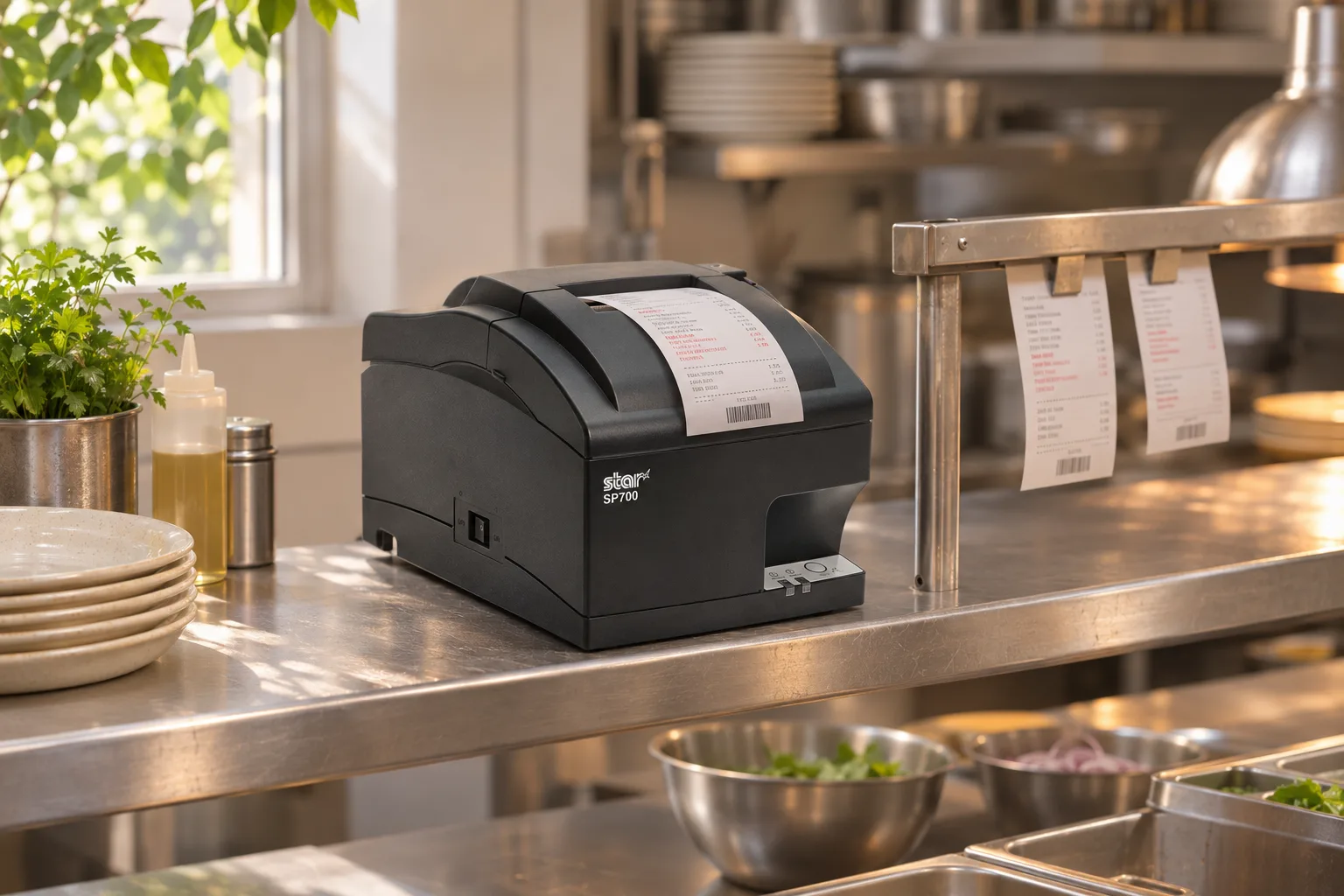
The best kitchen printer for most restaurants is the Star SP742 impact printer ($379 at Square). It prints on plain bond paper that heat from a grill or heat lamp can't darken, puts modifiers in red, makes carbon copies, and Square and Clover both sell it. For a quieter thermal ticket printer that can take a splash, get the Star mC-Print3 ($369 at Square) and keep it away from the line. Print customer receipts on a Star TSP143IV ($319 at Square) at the front counter. On Toast, use Toast's own kitchen printer; on Lightspeed, the Epson TM-U220IIB ($349).
Our quick picks
Compare the picks
| Feature | Best kitchen printer for most restaurantsStar Micronics SP742ME | Best thermal kitchen printerStar Micronics mC-Print3 | Best for the front counter and takeoutStar Micronics TSP143IV |
|---|---|---|---|
| Type | Impact (9-pin) receipt and kitchen printer | 3-inch direct thermal receipt printer | 3-inch direct thermal receipt printer |
| Speed | 4.7 lines per second (40 col) | 250 mm/s (1st gen), 400 mm/s (2nd gen) | 250 mm/s |
| Paper | 76 mm bond | 80 mm (58 mm with guide) | 80 mm (58 mm with guide) |
| Connection | Ethernet (USB and serial models) | Ethernet, USB (Bluetooth on some models) | USB-C, USB-A, Ethernet (Wi-Fi and Bluetooth on UEWB) |
| Where to buy | Check price at Amazon | Check price at Amazon | Check price at Amazon |
Best kitchen printer for most restaurants
Star Micronics SP742ME
- Type
- Impact (9-pin) receipt and kitchen printer
- Speed
- 4.7 lines per second (40 col)
- Paper
- 76 mm bond
- Connection
- Ethernet (USB and serial models)
Best thermal kitchen printer
Star Micronics mC-Print3
- Type
- 3-inch direct thermal receipt printer
- Speed
- 250 mm/s (1st gen), 400 mm/s (2nd gen)
- Paper
- 80 mm (58 mm with guide)
- Connection
- Ethernet, USB (Bluetooth on some models)
Best for the front counter and takeout
Star Micronics TSP143IV
- Type
- 3-inch direct thermal receipt printer
- Speed
- 250 mm/s
- Paper
- 80 mm (58 mm with guide)
- Connection
- USB-C, USB-A, Ethernet (Wi-Fi and Bluetooth on UEWB)
01Best kitchen printer for most restaurants
Star Micronics SP742ME
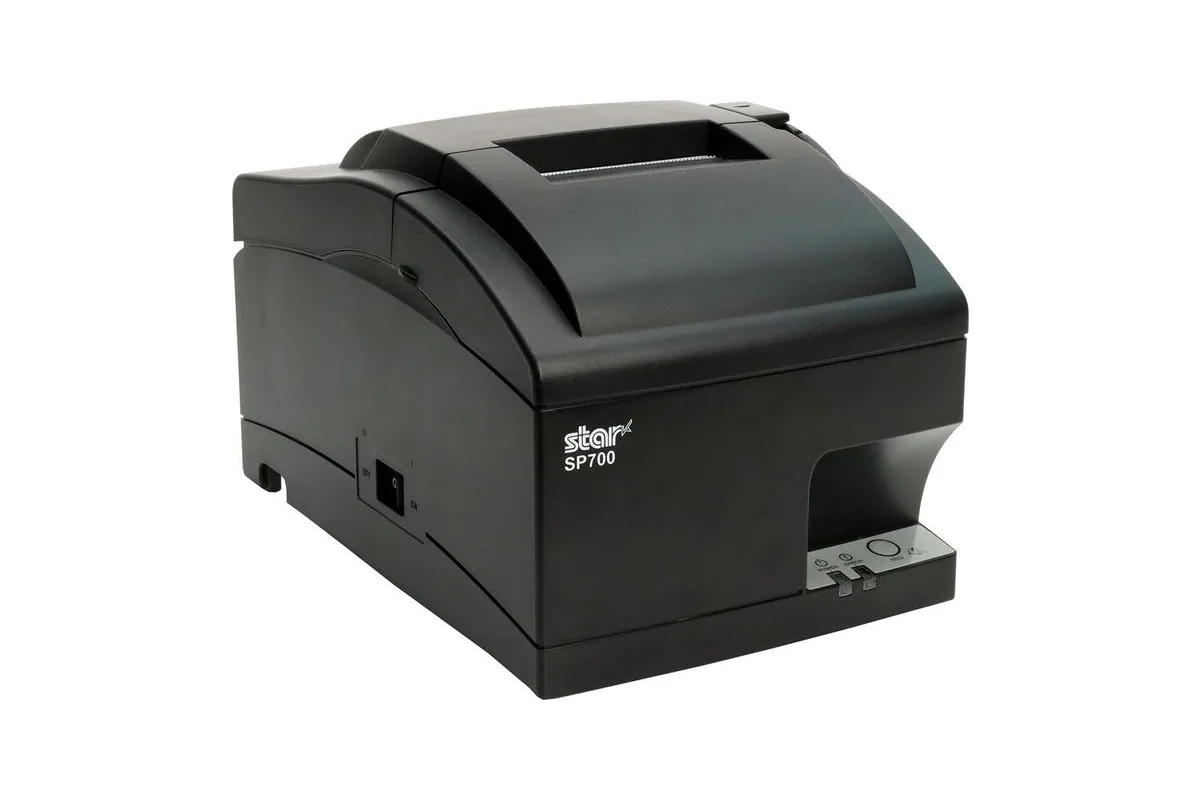
Star's impact (dot-matrix) kitchen printer: prints black and red on plain bond paper that heat near a grill can't fade.
The SP742 is the kitchen printer to buy. It's a 9-pin impact printer: pins strike an ink ribbon onto plain bond paper, so tickets stay readable next to a grill, fryer or heat lamp, where thermal paper darkens. With Star's two-color RC700BR ribbon it prints in black and red, so modifiers like "no onions" stand out, and on carbonless paper it makes an original plus up to two copies. Star rates it at 4.7 lines a second, or up to 13 tickets a minute, with an auto-cutter rated for 1 million cuts and a mean cycles between failures of 22 million lines.
Square sells the Ethernet SP742ME for $379 as its "Impact Printer" for kitchen tickets only (it won't print customer receipts on Square), and Clover sells the SP742ML by phone. It's $386 at Amazon and $401 at CDW in November 2026. It's slow and noisy next to thermal, and ribbons are an extra cost, though a small one: Square sells a ribbon for $9. Star also makes USB, serial and parallel versions, and a factory ESC/POS model for software that needs Epson's command set.
Good for
- Impact printing on bond paper doesn't fade from kitchen heat the way thermal paper does
- Two-color ribbon prints modifiers in red, and an auto-cutter is rated for 1 million cuts
- Square ($379) and Clover both sell it; Ethernet model shown, USB and serial versions too
Consider
- Slow and loud next to thermal: about 4.7 lines a second
- Needs ink ribbons as well as paper
02Best thermal kitchen printer
Star Micronics mC-Print3
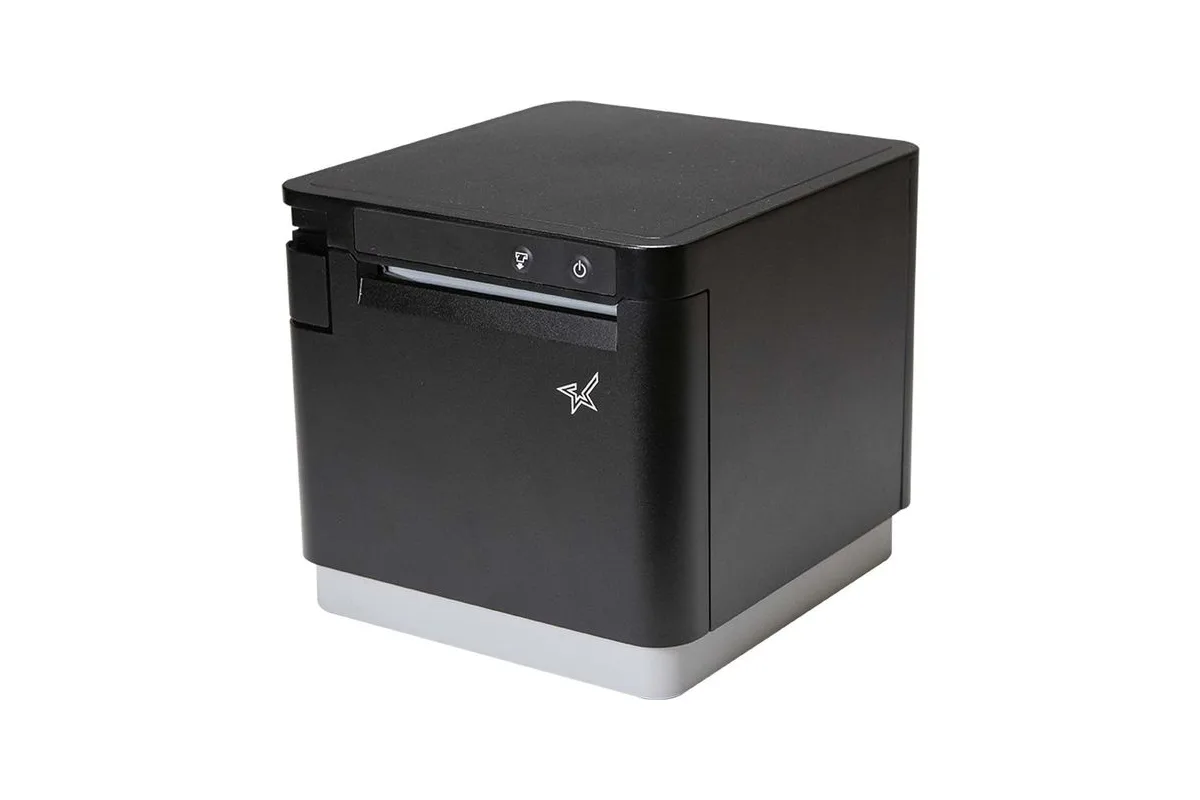
Star's splash-proof 3-inch cube printer with Ethernet, USB, CloudPRNT and web printing, sold by Square as its receipt and ticket printer.
The mC-Print3 is the thermal printer to put in a kitchen. The first generation is IPX2 splash-resistant and the second generation IP22, it prints 250 mm/s (400 mm/s on the second generation), and it's quiet. Square sells the first-generation MCP30 as its "Receipt & Ticket Printer" for $369, and Lightspeed's restaurant system supports it over USB or LAN. It has a cash drawer port, so the same model works at the counter.
It's still thermal: heat near the line darkens the paper, it prints black only, and it makes one copy. Mount it at the expo station or a prep area away from heat lamps and ranges, not on the hot line. The MCP30 sold at Square and on this Amazon listing ($356.53) has a 100 km head; the 2024 second generation is rated for 200 km. Read our [mC-Print3 review](/reviews/star-micronics-mc-print3-review).
Good for
- Square sells it ($369, first generation) as a receipt and kitchen ticket printer
- Splash-proof enclosure, Ethernet and USB, and CloudPRNT and WebPRNT for online orders
- The 2024 second generation (MCP31) prints at 400 mm/s with a 200 km head
Consider
- The first generation sold at Square and on this Amazon listing is 250 mm/s with a 100 km head
- Costs more than the TSP143IV for the same print ratings on the first generation
03Best for the front counter and takeout
Star Micronics TSP143IV
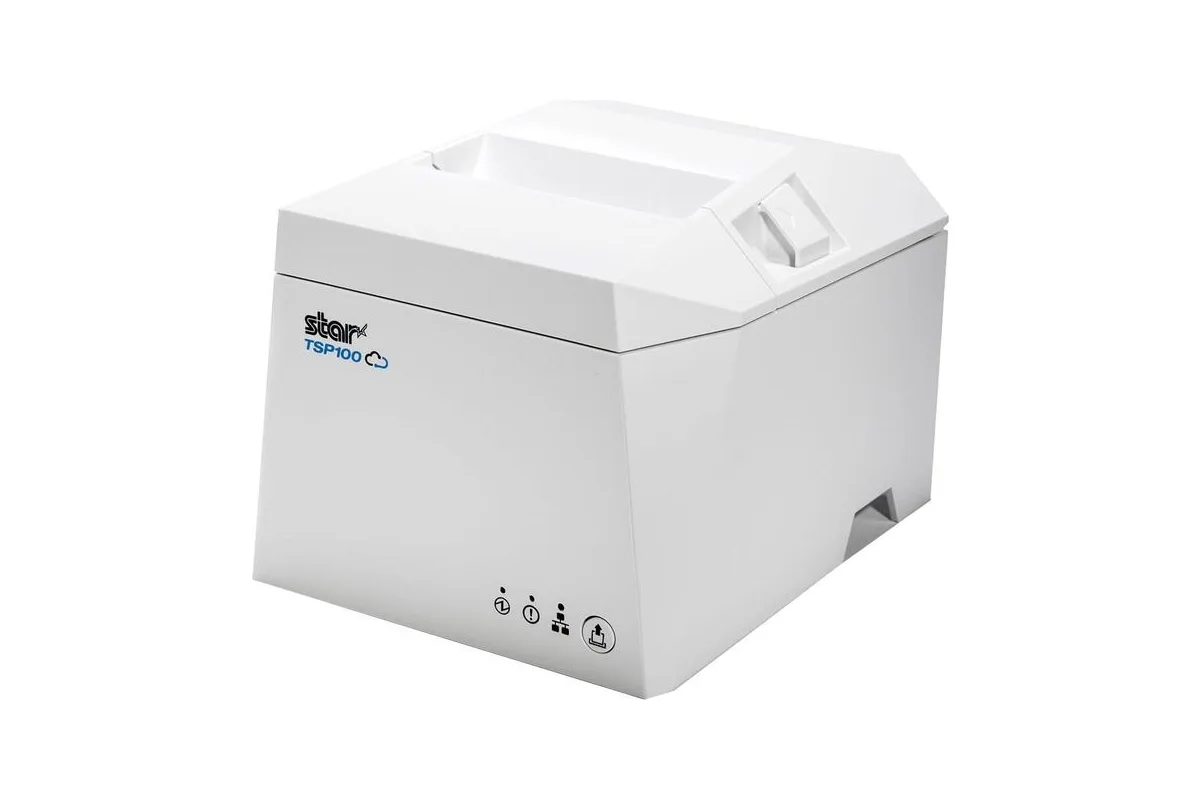
Star's standard 3-inch countertop receipt printer: 250 mm/s thermal printing with USB-C, USB-A and Ethernet built in, CloudPRNT, and support from Square, Shopify and most POS apps.
Every restaurant also needs a printer for customer receipts, and the TSP143IV is the one Square sells for it ($319 for the USB and Ethernet TSP143IVUE). It prints 250 mm/s, drives a cash drawer, and Lightspeed's restaurant system supports it over LAN or Wi-Fi. Keep it at the front counter or the bar, where heat isn't a problem.
For takeout and delivery, the TSP143IV SK version ($399 at Square) also prints sticky linerless labels, which Square sells for "heat-resistant delivery and takeout item labels". It's $293.10 at Amazon from third-party sellers in November 2026. Read our [TSP143IV review](/reviews/star-micronics-tsp143iv-review).
Good for
- The printer Square sells and recommends ($319 at Square for the USB/Ethernet TSP143IVUE), and on Shopify's supported list
- USB-C, USB-A, Ethernet and Android USB in every model; the UEWB (X4) adds Wi-Fi and Bluetooth ($289 at Shopify)
- Rated for 2 million cuts and a 100 km print head, with a cash drawer port and a 2-year warranty
Consider
- Its 100 km head rating is half the Epson TM-T88VII's 200 km, and the cutter does partial cuts only
- No Wi-Fi or Bluetooth on the UE model; you need the UEWB for wireless
How to choose
What you print
Mostly black text suits a mono laser. Color documents and the occasional photo suit an ink tank or inkjet.
Running costs
Compare cost per page rather than cartridge prices. Ink tanks and lasers cost more upfront and far less over time.
Ink and account terms
Check whether the printer blocks third-party ink or toner, or requires an account or subscription to work.
What is the best kitchen printer for a restaurant?
The Star SP742 is the best kitchen printer for most restaurants. It’s an impact printer, so its tickets are ink on plain bond paper and don’t turn dark next to a grill or heat lamp, and its two-color ribbon prints modifiers in red. Square sells it for $379 and Clover sells it too, which makes it the kitchen printer with the widest POS support.
Restaurants usually need two kinds of printer: an impact printer on the hot line, and a thermal printer for customer receipts at the counter. If your kitchen tickets go to an expo station or a cold prep area, a splash-resistant thermal printer like the Star mC-Print3 also works.
| Printer | Type | Speed (maker) | Colors | Copies | POS stores that sell it | Price (Nov 2026) |
|---|---|---|---|---|---|---|
| Star SP742 | Impact | 4.7 lines/s (up to 13 tickets/min) | Black and red | Original + up to 2 | Square, Clover | $379 Square, $386 Amazon |
| Star mC-Print3 | Thermal, splash-resistant | 250 mm/s (1st gen), 400 mm/s (2nd gen) | Black | 1 | Square | $369 Square, $356.53 Amazon |
| Star TSP143IV | Thermal | 250 mm/s | Black | 1 | Square, Shopify | $319 Square, $293.10 Amazon |
| Epson TM-U220II | Impact | Up to 6.0 lines/s (30 columns) | Black and red | Original + 1 | Lightspeed (U220IIB) | $349 Lightspeed |
Thermal vs impact receipt printer: which do I need?
Get a thermal printer for receipts and an impact printer for a hot kitchen. Thermal printers are faster, quieter and use nothing but paper. Impact printers are slower and need ribbons, but their tickets survive heat, can print in two colors and can make carbon copies.
| Thermal (TSP143IV, mC-Print3) | Impact (SP742, TM-U220II) | |
|---|---|---|
| How it prints | Heated head darkens coated paper | Pins strike an ink ribbon onto paper |
| Speed | 250–400 mm/s | 4.7–6.0 lines a second |
| Heat near the line | Paper darkens | Bond paper isn’t affected |
| Color | Black only | Black and red with a two-color ribbon |
| Copies | One | Carbon copies on 2-ply paper |
| Supplies | Thermal paper only | Bond paper plus ribbons |
| Paper | 3-1/8” (80 mm) x 230’ thermal | 3” (76 mm) bond, 150–165’ |
| Paper per 6-inch ticket (estimate) | About 0.3¢–0.9¢ | About 0.3¢–0.7¢ (1-ply bond) |
| Noise | Near-silent, Star says | Louder |
| Customer receipts | Yes | Square sells the SP742 for kitchen tickets only |
Paper costs are our estimates from November 2026 case prices: 50 rolls of 3” x 165’ bond cost $44.95 at POS Paper and $67 at Uline, against $67.95 to $99 for 50 rolls of 3-1/8” x 230’ thermal. Our receipt paper guide has the full table.
Why do restaurant kitchens use impact printers?
Mostly because of heat. Thermal paper prints when it’s heated, so heat from a range, fryer or heat lamp keeps “printing” on it: Star says heat and humidity are the main concern with thermal printers in kitchens because they damage heat-sensitive paper. Toast tells restaurants not to place a printer near heat lamps or ranges, or to put tickets on or under a heat source. Bond paper has no heat-sensitive coating, and Epson says impact paper stands up to heat and moisture to stay legible.
Three other reasons keep impact printers on the line:
- Red modifiers. With a black and red ribbon, a ticket prints the item in black and the modifier in red. Toast says that’s how the Epson TM-U220 and its own TKP300 kitchen printer print tickets.
- Carbon copies. On 2-ply carbonless paper, one ticket gives the cook and the expo station a copy each. Toast warns never to use 3-ply paper in the TM-U220 or the TKP300.
- No chemical coating near food. Minnesota’s pollution agency says bond paper doesn’t use the chemical developers (BPA or BPS) in thermal paper, and advises not to put thermal tickets directly on food.
Star makes the case for thermal too: it’s faster and near-silent, heat-resistant thermal paper exists, and Star says many kitchens now use thermal printers placed away from the heat.
Can you use a thermal printer in a kitchen?
Yes, if it sits away from the heat. Put a thermal printer at the expo window, a cold prep station or a pass that isn’t under heat lamps, and buy one built for spills. The Star mC-Print3 is IPX2 splash-resistant in its first generation and IP22 in its second, and Square sells it as a receipt and ticket printer. Epson’s TM-m30III is IPX2 spill-resistant with its paper exiting from the front, and Square lists the earlier TM-m30 and TM-m30II as kitchen printers.
If tickets hang on a rail above a grill, or the printer sits on the line itself, use an impact printer.
Which kitchen printer works with my POS?
- Square: the Star SP742ME ($379), recommended by Square, which also lists the SP742ML and SP742MU. The mC-Print3 ($369) is Square’s thermal ticket printer. Square’s Ethernet printers must be on the same router or switch as the POS.
- Clover: the Star SP742ML, which Clover sells by phone with no public price. Clover’s FAQ also names the Epson TM-U220B, which it doesn’t sell.
- Toast: the Toast Kitchen Printer, sold by Toast, or the Epson TM-U220B, which Toast lists as “no longer sold, but still supported”. Toast lists no Star printer.
- Lightspeed Restaurant (K-Series): Epson’s TM-U220, TM-U220B and TM-U220IIB over LAN. Lightspeed sells the TM-U220IIB for $349. It also supports the mC-Print3 and TSP143IV for thermal tickets.
- Shopify POS: no impact printer on Shopify’s list; use a thermal printer such as the mC-Print3 away from heat.
Our POS compatibility guide has the full lists.
How much do kitchen printer paper and ribbons cost?
Less than a cent a ticket for paper, and a fraction of a cent for ribbon. One-ply 3-inch bond costs about 0.27¢ to 0.67¢ per 6-inch ticket by the 50-roll case (our estimate from POS Paper, Uline and Office Depot prices), and 2-ply carbonless about 0.83¢ (Uline, 50 rolls of 3” x 90’ for $75). Lightspeed sells 50 rolls of impact paper for $79.
Star rates its RC700B black ribbon for up to 3 million characters and its two-color RC700BR for 1.5 million black and 750,000 red characters. Assuming a 400-character ticket, that’s about 3,750 to 7,500 tickets a ribbon, or roughly 0.1¢ to 0.25¢ a ticket at Square’s $9 ribbon price (our estimate). Epson rates its ERC-38B black ribbon for the TM-U220II at up to 4 million characters.
Should a kitchen printer use Ethernet, Wi-Fi or Bluetooth?
Ethernet. Lightspeed says Bluetooth and Wi-Fi “are not recommended for kitchen use due to the potential for wireless interference”, that Bluetooth and USB printers connect to one POS device only, and that a printer should have a fixed IP address (a DHCP reservation or static IP) so it stays reachable. A wired printer can take orders from every register and tablet on the network. Square sells the SP742ME with a 6 m LAN cable in the box. Our setup guide covers fixed IPs and cabling.
How long does a kitchen printer last?
Years, on the makers’ ratings. Star rates the SP742’s cutter for 1 million cuts, about 9 years at 300 tickets a day, and its print head for 150 million characters. Assuming a 400-character ticket, that head rating is about 375,000 tickets, or roughly 3.4 years at 300 tickets a day (our estimates; Star doesn’t say what a typical ticket holds). Epson’s US spec sheet for the TM-U220II gives no head, cutter or failure-rate figure.
Thermal printers are rated differently, in kilometers of paper. The first-generation mC-Print3’s 100 km head works out to about 656,000 six-inch tickets and its cutter to 2 million cuts; the second generation doubles the head rating to 200 km. Makers call all of these estimates, not warranties. Star and Epson give these printers a 2-year warranty, and Star sells Extend-A-Star plans of 3 and 4 years for the SP742.
How we chose
We compared kitchen printers sold new in the US in November 2026 on Star’s and Epson’s spec sheets, the supported-printer lists and stores of Square, Clover, Toast, Lightspeed and Shopify, Toast’s and Star’s kitchen guidance, and paper and ribbon prices, all read on November 27, 2026. POS support and heat tolerance counted most. We haven’t tested these printers ourselves; see how we score.
Also consider
- Epson TM-U220II: Epson’s impact kitchen printer, announced July 11, 2024 as a drop-in replacement for the TM-U220. It prints up to 6.0 lines a second in black and red, adds Epson’s Server Direct Print, and is the impact printer Lightspeed sells ($349 for the TM-U220IIB). It’s $458.99 at CDW.
- Star SP712: the SP742 with a tear bar instead of an auto-cutter.
- A label printer for takeout: Square’s Thermal Sticky Label Printer (the Star TSP143IV SK, $399) labels bags and items. For shelf and barcode labels, see the best label makers.
Questions people ask
Do kitchen printers print in red?
Impact kitchen printers do, with a two-color ribbon: the Star SP742 uses the RC700BR and the Epson TM-U220II the ERC-38BR. The POS app decides what prints in red; Toast prints modifiers in red on its kitchen printers.
Can a kitchen printer print customer receipts?
Technically yes, but Square sells its SP742 impact printer for kitchen tickets only. Use a thermal printer such as the TSP143IV for receipts.
Does heat fade thermal tickets?
Heat darkens them. Thermal paper changes color when heated, so a ticket near a grill or under a heat lamp can turn gray or black. Paper makers rate stored receipts for about 10 to 12 years, but only in cool, dark storage; see how long thermal receipts last.
What paper does an impact kitchen printer use?
3-inch (76 mm) bond paper, 1-ply or 2-ply carbonless, in rolls up to 85 mm across for the SP742 and 83 mm for the TM-U220II. It isn’t thermal paper.
Is the Star SP742 loud?
It’s louder than a thermal printer, since pins strike a ribbon for every line. Star calls thermal printers near-silent by comparison.
What’s the difference between the Star SP742 and the Epson TM-U220II?
Both are 76 mm impact printers that print black and red. Both print 4.7 lines a second at 40 columns; the Epson reaches 6.0 lines a second at 30 columns. The SP742 makes up to two copies against the Epson’s one, and Square and Clover sell it, while Lightspeed sells the Epson ($349) and Toast supports the older TM-U220B. Pick the one your POS lists.
Does a kitchen printer need ESC/POS?
Only if your software sends Epson’s ESC/POS commands. The TM-U220II uses ESC/POS natively. Star sells a factory ESC/POS version of the SP742ME, and in February 2026 Star said it had added ESC/POS emulation to the SP742 over LAN.
Sources
- Star Micronics SP742 impact printer, starmicronics.com
- Star Micronics SP742 specification sheet, media.starmicronics.com
- Star Micronics: thermal receipt printers in a kitchen environment, star-emea.com
- Star Micronics mC-Print3 thermal receipt printer, starmicronics.com
- Star Micronics TSP143IV thermal receipt printer, starmicronics.com
- Star Micronics TSP143IV SK sticky linerless label printer, starmicronics.com
- Epson TM-U220II kitchen and receipt impact printer, Epson
- Epson TM-U220II specification sheet (CPD-64917), mediaserver.goepson.com
- Square Shop: Impact Printer (Star SP742ME), squareup.com
- Square Shop: Receipt & Ticket Printer (mC-Print3), squareup.com
- Square Shop: accessories, squareup.com
- Square compatible printers, squareup.com
- Clover POS accessories, clover.com
- Clover FAQ: compatible printers, clover.com
- Toast compatible printers, support.toasttab.com
- Toast: printer paper rolls and ink ribbons, intercom.help
- Lightspeed K-Series supported hardware, k-series-support.lightspeedhq.com
- Lightspeed K-Series: setting up a receipt printer, k-series-support.lightspeedhq.com
- Lightspeed hardware store, store.lightspeedhq.com
- Uline cash register paper, uline.com
- POS Paper 3 x 165 1-ply bond paper, pospaper.com
- Minnesota Pollution Control Agency: BPA and BPS in thermal paper, pca.state.mn.us
- CDW: Star SP742ME, cdw.com
Keep exploring

Buying guide
The best barcode label printers
The Zebra ZD421 is the best barcode label printer for most businesses: 4-inch labels at 6 inches a second, any brand of label roll and a 24-month warranty, for about $480 to $526 in November 2026. Get the Brother QL-820NWBc ($229.99) for an office or shop counter, and a thermal transfer model for inventory labels that have to last.
Read story
Buying guide
The best check printers for a small business
The TROY 3001dw ($509.15 at TROY, $530 at Amazon in November 2026) is the best check printer for a small business: a 35 ppm Wi-Fi laser with MICR toner, rated for 350 to 2,500 checks a month, at about 5¢ to 7¢ per check three to a page by our estimate. Get the TROY 4001dn for a locking tray, or the VersaCheck M15 MXD ($399.99) for software in the box.
Read story