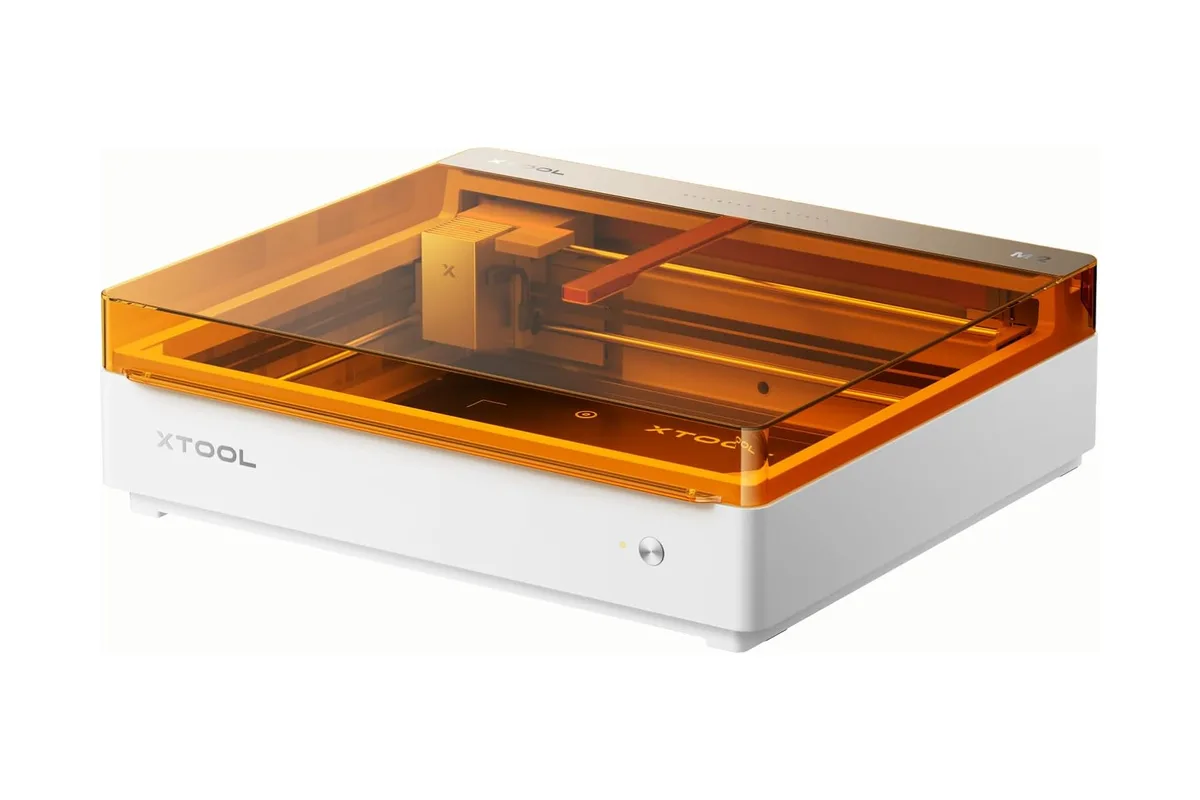
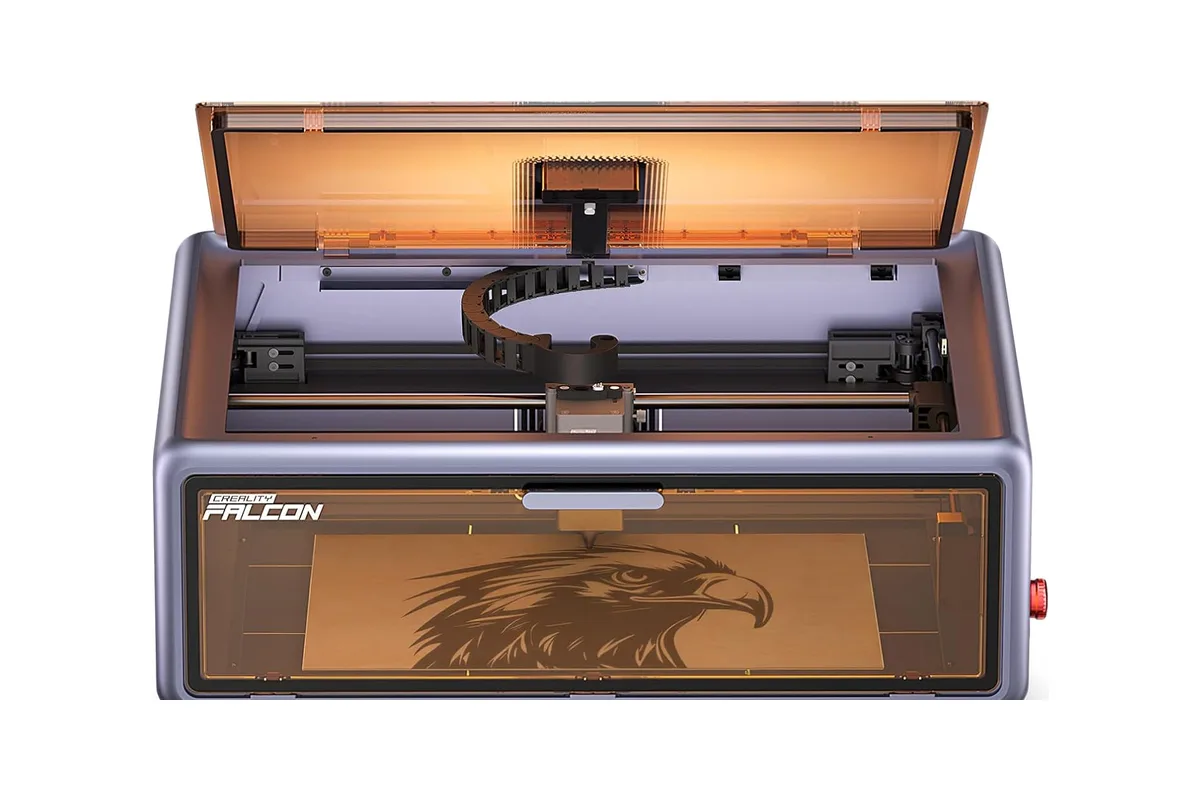
Side by side
| Feature | xTool M2 | Creality Falcon A1 |
|---|---|---|
| Type | Enclosed diode laser | Enclosed diode laser |
| Power | 10W, 20W or 40W optical | 10W optical |
| Work area | 426 x 320 mm | 305 x 381 mm |
| Safety | Class 1 | Class 1 (FDA) |
| Where to buy | Check price at Amazon | Check price at Amazon |
xTool M2
- Type
- Enclosed diode laser
- Power
- 10W, 20W or 40W optical
- Work area
- 426 x 320 mm
- Safety
- Class 1
Creality Falcon A1
- Type
- Enclosed diode laser
- Power
- 10W optical
- Work area
- 305 x 381 mm
- Safety
- Class 1 (FDA)
xTool vs Creality Falcon: which is better?
For an enclosed laser, xTool, by way of the xTool M2 over the Creality Falcon A1. At 10W they’re $35 apart at Amazon in November 2026: $474 for the M2 against $439 for the A1 (the M2 is $499 at xTool). The M2 has the bigger bed, 426 x 320 mm against 305 x 381 mm, and xTool rates it at 8 mm of basswood in one pass, where Creality gives the A1 a 6 mm wood limit without saying how many passes. The M2 also adds autofocus, comes in 20W and 40W versions, and takes color inkjet and infrared add-ons.
The Falcon A1 is the better buy if price and software freedom come first. It’s the cheapest enclosed Class 1 laser with a camera from either brand, and it works with LightBurn and the free LaserGRBL as well as Creality’s own Falcon Design Space. The M2 runs only xTool Studio. With a rotary for tumblers, the A1 setup costs about $180 less (our estimate).
If you want raw power for the money and can live with an open frame, Creality’s Falcon2 40W is $639. It isn’t enclosed, so you need safety glasses and your own fume handling; see the Falcon2 section below.
Side by side
| xTool M2 (10W) | Creality Falcon A1 (10W) | |
|---|---|---|
| Price (November 2026) | $499 at xTool (was $599); $474 at Amazon. 20W $899 / $829; 40W $1,299 / $1,149 | $439 at Creality (was $599), Best Buy and Amazon |
| Laser (maker wording) | 10W blue diode; 200 W max machine input | 10W optical power; 120W max machine power |
| Other versions | 20W, 40W; 3W infrared add-on; CMYK inkjet add-on | A1 Pro 20W ($835) with an optional 2W infrared module |
| Work area | 426 x 320 mm (about 211 sq in) | 305 x 381 mm (about 180 sq in) |
| Top speed | 600 mm/s | Up to 600 mm/s |
| Maker’s cut figures | One pass: 8 mm basswood, 3 mm black acrylic | Not on the spec table; Creality’s FAQ: 6 mm wood, 9.6 mm non-transparent acrylic, passes not stated |
| Camera and focus | 5MP panoramic and 2MP close-range cameras; autofocus probe | HD camera with auto-positioning and QR material recognition |
| Laser class | Class 1 (TÜV SÜD certified) | Class 1 (FDA) |
| Software | xTool Studio only (Windows, macOS) | Falcon Design Space, LightBurn, LaserGRBL |
| Rotary | RA3 Lite, $259, 0–100 mm | Rotary Kit Pro Package for the A1, $139 |
| Purifier | AP2 mini, $299 | Desktop Smoke Purifier for the A1, $179 |
| Size and weight | 610 x 569 x 180 mm; 12.3 kg | 567 x 468 x 196 mm; 15.55 kg |
| Warranty | 12 months on main parts | 12 months; accident cover from $29.99 a year |
Both makers quote the laser’s light output, not its draw from the wall. Creality labels it “optical power” and lists 120W machine power separately; xTool lists 200 W as the M2’s maximum input. So these are like-for-like 10W lasers. Square inches are our arithmetic.
Which costs less to set up?
The Falcon A1, by about $180 with a rotary. Our estimates from each maker’s store prices on November 27:
| Setup | xTool M2 10W | Creality Falcon A1 |
|---|---|---|
| Machine | $499 | $439 |
| + rotary for tumblers | $259 (RA3 Lite) | $139 (Rotary Kit Pro Package) |
| Vented to a window | $758 | $578 |
| + maker’s purifier, for a room without a window | $299 (AP2 mini) | $179 (Desktop Smoke Purifier) |
| Total with purifier | $1,057 | $757 |
Both are enclosed and Class 1, so neither needs safety glasses or a separate enclosure. Creality also sells A1 kits at $599 (Basic) and $699 (All in One). Most of these prices are Black Friday sale prices: xTool’s sale was in its last hours when we checked, and Creality’s ran “Black Friday Mega Sale” pricing.
Which cuts better?
The M2, as far as the makers’ numbers go. xTool rates the 10W M2 at 8 mm of basswood and 3 mm of black acrylic in one pass, the 20W at 10 mm and 8 mm, and the 40W at 15 mm and 11 mm.
Creality publishes no cut figures on the A1’s spec table. Its FAQ gives the A1 a 6 mm limit for wood and 9.6 mm for non-transparent acrylic, but Creality’s FAQ limits aren’t one-pass figures: on its open-frame Falcon2, the same FAQ says 20 mm of wood, while Creality’s own settings table tops out at 10 mm of basswood in one pass on the 22W. Expect several passes to reach the A1’s limits.
Both are blue diode lasers with the same blind spots. Neither cuts clear acrylic (Creality says so outright), and in xTool’s own test, 5 mm white and blue acrylic wouldn’t cut in one pass at 20W. Neither marks bare metal without an infrared module: xTool sells a 3W one for the M2, and Creality puts a 2W module on the A1 Pro, not the A1. See what a diode laser can cut.
Which is easier for a beginner?
Both are good first lasers: enclosed, Class 1 and camera-guided, so you place a design on the material by eye on screen. The M2 does a little more for you. Its autofocus probe sets the laser height, and its two cameras give a wide view and a close one. The A1 reads QR codes on Creality materials to load settings.
Software decides it for some buyers.
- xTool M2: xTool Studio only, on Windows and macOS. xTool froze its older xTool Creative Space at version 2.7 in June 2025, and new xTool machines, the M2 included, run only Studio. LightBurn isn’t listed for the M2.
- Falcon A1: Creality’s free Falcon Design Space, the free LaserGRBL (Windows), or LightBurn. LightBurn’s Core license, which covers G-code lasers, costs $99 once with a year of updates, then $40 for each further year of updates.
If you already use LightBurn, or want one program that will run your next laser from another brand, the A1 keeps that open.
Which is better for tumblers?
Either, with a rotary. The M2’s RA3 Lite ($259) takes objects from 0 to 100 mm across. Creality’s rotary package for the A1 is $139; we couldn’t find its size limits. Both lasers engrave powder-coated tumblers by removing the coating; neither marks bare stainless without an infrared module. Our laser engraving how-to walks through a tumbler job.
Which has the better warranty?
They’re about even: 12 months each, with no separate term for the laser module.
- xTool: main parts covered for 12 months. Accessories such as lens protectors aren’t covered beyond damage on arrival, and an on-site technician’s call is charged even under warranty, with parts free.
- Creality: 12 months, claimed within a year with proof of purchase. Opening the shell, unauthorized modifications, third-party parts Creality hasn’t certified and “burning accidents” are excluded, and the claim lapses if you don’t ship the machine back within 7 days of approval. Creality sells accident cover through Seel for the A1: $29.99 for 1 year, $44.99 for 2 and $49.99 for 3.
What about 20W?
At 20W the prices meet: the M2 20W is $829 at Amazon ($899 at xTool), and Creality’s Falcon A1 Pro is $835 at Creality and Amazon (sold out at Best Buy). The M2 20W keeps the bigger 426 x 320 mm bed and xTool’s rated 10 mm basswood and 8 mm black acrylic in one pass. The A1 Pro has a smaller 268 x 358 mm bed, but it’s the one to pick if you want metal marking from Creality, through its optional 2W infrared module.
Is the Creality Falcon2 good?
It’s good value for cutting, but it’s an open-frame laser, and that changes what you need to buy. The Falcon2 22W is $549 and the 40W $639 (was $1,319) at Creality. The 12W version is no longer sold.
- Power: Creality’s settings table puts the 22W at 10 mm of basswood in one pass and the 40W at 15 mm, with 4.6 mm black acrylic in one pass on both. The 40W has a 400 x 415 mm bed and a top speed of about 417 mm/s (25,000 mm/min), and Creality says it cuts 20 mm cork and 0.15 mm stainless steel in one pass.
- Safety: it has no enclosure, and Creality doesn’t state a laser class. Open-frame diode lasers are Class 4: the beam and its reflections can injure eyes and skin. Atomstack, another diode maker, calls safety glasses “mandatory every single time you power on”, and OSHA says laser eyewear must be labeled with its optical density (OD) and wavelengths. Creality’s $29.99 glasses cover 180–534 nm, but the store page doesn’t give an OD.
- Setup: our estimate for the 40W with Creality’s $59 enclosure, $109 rotary and $29.99 glasses is $836.99, or $1,335.99 with its $499 air purifier. It has no camera.
For about the same total, an enclosed Class 1 laser makes more sense for a beginner. Creality’s enclosed Falcon2 Pro costs $849 (22W), $1,279 (40W) or $1,899 (60W), with a top camera, and Creality rates the 60W at 22 mm of basswood in one pass. The 40W M2 ($1,149 at Amazon) is rated at 15 mm basswood and 11 mm black acrylic in one pass. The Falcon2 Pro S is out of stock.
What’s new at Creality and xTool: Creality added the compact enclosed Falcon A1C ($242 for 5W, $313 for 10W) and the T1, a galvo laser from $1,999. xTool’s enclosed S1 is no longer sold new on xtool.com (a refurbished 40W is $1,199), so the M2 is now its enclosed diode laser.
The verdict
Buy the xTool M2 if you’ll cut as well as engrave, or want room to grow. For $35 more at Amazon it has a bigger bed, autofocus, the better-documented cut figures, and 20W and 40W versions with color inkjet and infrared add-ons.
Buy the Creality Falcon A1 if you mainly engrave and want the cheapest enclosed, camera-guided laser: $439, or about $578 with a rotary. It’s also the one to pick if you want to use LightBurn. For other picks, see the best laser engravers, and for what a full setup costs, how much a laser engraver costs.
Questions people ask
Is xTool better than Creality?
Not across the board. xTool’s M2 beats the Falcon A1 on bed size, autofocus and published cut figures for a small premium, and xTool’s range runs up to CO2 lasers like the P2S. Creality is cheaper and more open: its lasers work with LightBurn and LaserGRBL, and its open-frame Falcon2 gives the most laser per dollar if you add your own safety gear.
Is the Creality Falcon A1 good for beginners?
Yes. It’s enclosed and Class 1, so you don’t need safety glasses in normal use, and its camera places designs for you. Its 10W laser is best for engraving and thin cuts; Creality gives a 6 mm wood limit.
Does the xTool M2 work with LightBurn?
xTool lists only xTool Studio for the M2. If LightBurn matters to you, the Falcon A1 and A1 Pro support it, as do xTool’s F2 and P2S.
Can either one cut clear acrylic?
No. Both are blue diode lasers, which pass through clear acrylic. You need a CO2 laser such as the xTool P2S. See diode vs CO2 vs fiber lasers.
Do the M2 and Falcon A1 need ventilation?
Yes. The enclosures contain the laser light, not the smoke. Vent each through its exhaust to a window, or use a purifier (xTool’s AP2 mini at $299 or Creality’s A1 purifier at $179). MIT’s safety office says never to leave an operating laser cutter unattended. See laser engraving safety.
What replaced the xTool S1?
The S1 is no longer sold new on xtool.com; only a refurbished 40W ($1,199) and accessories are listed. xTool’s enclosed diode laser now is the M2.
Sources
- xTool M2 color craft laser, xtool.com
- xTool M2 product overview, xtool.com
- xTool SafetyPro AP2 air purifiers, xtool.com
- xTool RA3 rotary, xtool.com
- xTool after-sale policies, xtool.com
- xTool: transition from XCS to xTool Studio, support.xtool.com
- xTool S1 collection, xtool.com
- Creality Falcon A1 10W, crealityfalcon.com
- Creality Falcon A1 Pro 20W, crealityfalcon.com
- Creality Falcon2 40W, crealityfalcon.com
- Creality Falcon2 22W, crealityfalcon.com
- Creality Falcon2 Pro, crealityfalcon.com
- Creality Falcon A1C, crealityfalcon.com
- Creality Falcon laser engravers and FAQ, crealityfalcon.com
- Creality Falcon2 engraving and cutting parameter settings, crealityfalcon.com
- Creality Falcon: laser engraver optical power, crealityfalcon.com
- Creality Falcon warranty policy, crealityfalcon.com
- LightBurn: which license do you need?, lightburnsoftware.com
- LightBurn: laser types explained, docs.lightburnsoftware.com
- Atomstack: laser engraver safety guide, atomstack.com
- OSHA Technical Manual: laser hazards, osha.gov
- MIT EHS: laser cutter safety guidance (PDF), ehs.mit.edu
- Best Buy: Creality Falcon lasers, bestbuy.com
- xTool M2 on Amazon, amazon.com
- Creality Falcon A1 on Amazon, amazon.com
Keep exploring

Buying guide
The best color label printers for product labels
The Epson ColorWorks CW-C4000 is the best color label printer for product labels: pigment CMYK ink at up to 1200 dpi, rolls up to 4.25 inches wide, 4 inches a second and BS 5609 certification on Kimdura poly, for $2,499 at CDW in November 2026. Get the Primera LX610 ($2,695) to print and cut custom shapes, or the Primera LX500 ($1,549) on a budget.
Read story
Buying guide
The best edible printers for cakes and cookies
The best edible printer for cakes is a new Canon PIXMA TS702a bought in an edible ink bundle: $295 to $299 in November 2026, for letter and legal-size frosting sheets at about $1 to $3 a cake topper. For printing straight onto cookies, the Primera Eddie is $2,995 and uses about 6¢ of ink per cookie.
Read story