Printers in this guide
How does DTF printing work?
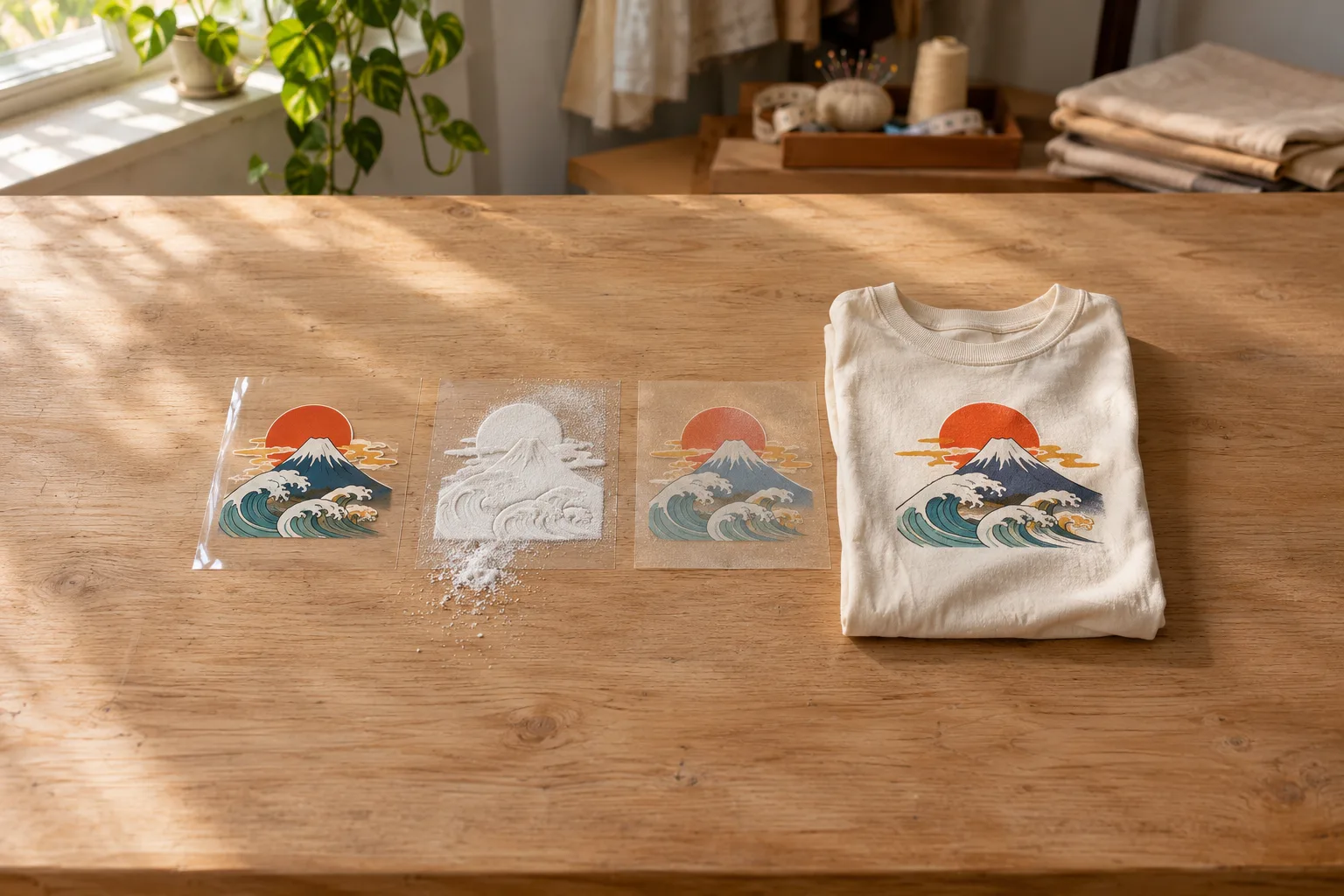
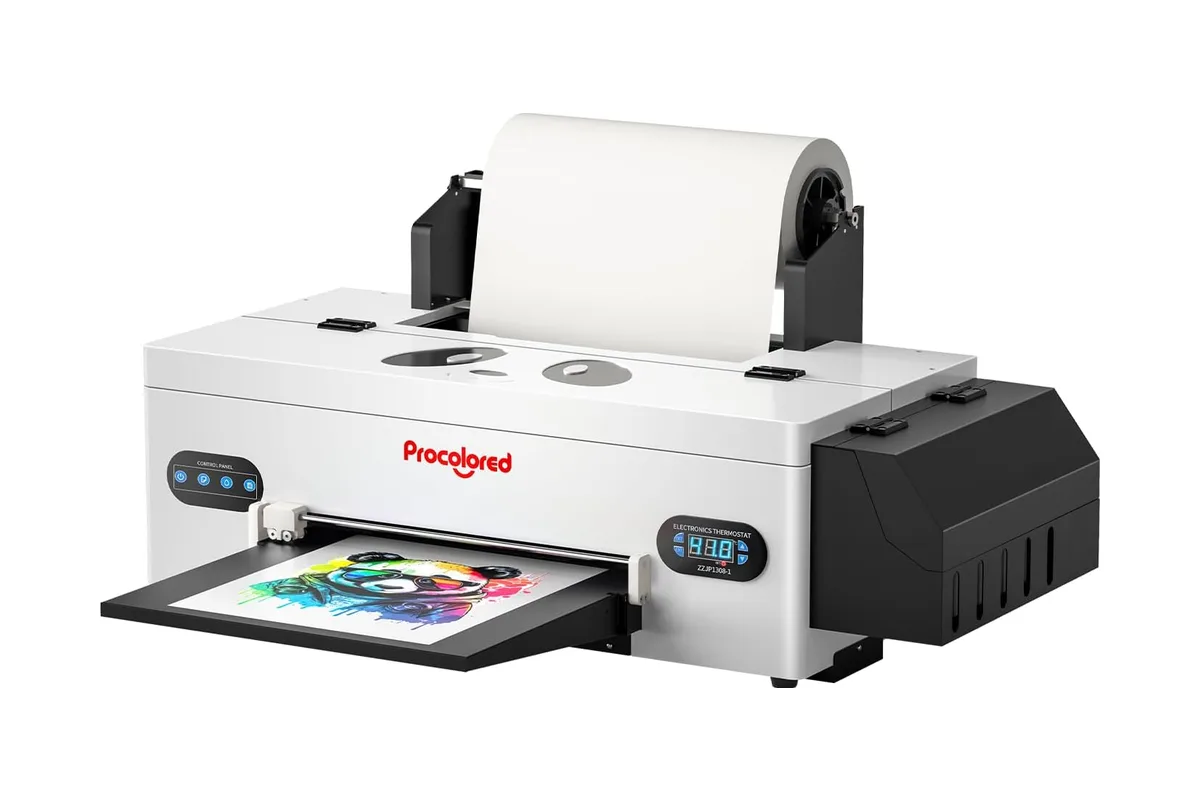
DTF (direct-to-film) printing prints your design onto PET film, coats it with glue powder, melts the glue, and presses the film onto a shirt. A DTF printer such as the Procolored F13 Panda lays down the color layer first and then a white layer on top. A heat press then bonds it to the shirt at about 275–325°F for 8–15 seconds, depending on the film. Four steps:
- Print, mirrored, on PET film. Epson’s description: CMYK prints first, then white, and the image is printed in reverse. Roll printers like the F13 Panda feed film from a 13-inch roll and cut it.
- Powder the wet ink. While the ink is still wet, hot-melt adhesive powder is spread over the whole print and the excess is shaken off.
- Cure the powder. Heat melts the powder into a glue layer. Procolored uses a curing oven, xTool its OS1 shaker oven, and Epson’s own workflow a heat press. Powder and film makers’ cure settings include 250°F for 2 minutes (Uninet), 212–248°F for 2–3 minutes in an oven (GPI), and hovering a press at 320°F for 2 minutes until the surface looks like orange peel (OmniPrint).
- Press and peel. The cured film can go on a shirt right away or be stored for later. Press it glue side down, peel the film off hot, warm or cold as its maker says, and most films then get a short second press.
When the film comes off, the white layer sits under the color, which is why a DTF print is bright on a black shirt.
What do I need to start DTF printing?
A DTF printer and its RIP software, DTF ink with white, PET film, adhesive powder, a way to cure the powder, a heat press and blanks, plus a mask and ventilation for the powder and curing. Here’s the list with November 2026 prices:
| Item | What it does | Price, November 2026 |
|---|---|---|
| DTF printer | Prints color and white on film | $1,599 (Procolored K13 Lite or F8, printer only, on sale for Black Friday) to $4,995 (Epson F1070) |
| RIP software | Builds the white layer and drives the printer | Included with Procolored, xTool and Epson; Digital Factory DTF $445 at Lawson |
| DTF ink, CMYK and white | Pigment ink for film | About $69 to $118 a liter |
| PET film | Carries the print | About 15¢ to 48¢ a square foot on a roll |
| Adhesive powder | The glue that bonds the print | About $30 to $55 a kilogram |
| Curing | Melts the powder | Procolored oven $599; Procolored shaker-dryer $1,799; xTool OS1 shaker oven $2,999; or a heat press, hovering |
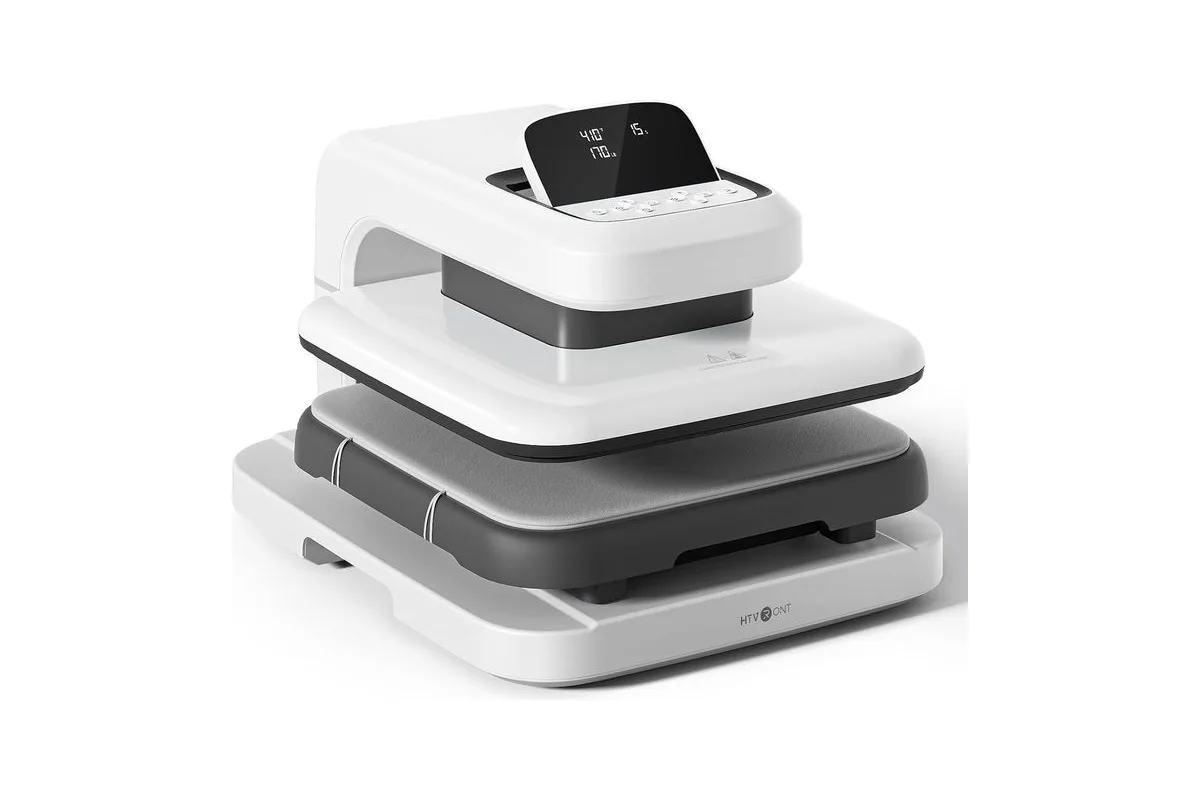
| Heat press | Presses the transfer onto the shirt | $279.99 for an HTVRONT Auto Heat Press 2 (15 x 15) |
| Tray and sieve or shaker | For powdering by hand | A tray larger than the film |
| Mask and eye protection | For powdering and maintenance | Epson lists both |
| Ventilation | For curing fumes | xTool requires an air purifier with its OS1 |
| Blanks | Shirts | From $2.51 for a white Gildan G500 at ShirtSpace |
Epson’s F1070 guide adds a heat-resistant cover sheet for pressing (parchment for a matte finish, Teflon for gloss) and opaque tape, warning that clear tape can make the printhead strike the film. Procolored’s printer bundles include a starter supply of ink, film and powder. For full setup costs, see how much DTF printing costs; if you’d rather skip the printer, see DTF transfers vs your own printer.
Do I need a powder shaker for DTF printing?
No. You can powder by hand: Epson’s own DTF workflow for the F1070 is to lay the wet print in a tray, sprinkle powder over it with a sieve or shaker, tip off the excess and cure it under a heat press. Epson lists the powder shaker and oven as “(optional)” on its small-business page. Hand powdering suits a sheet-fed printer or a few transfers at a time.
An automatic shaker powders, shakes and cures roll film in one pass, which is what keeps up with a roll printer making volume. On Procolored’s new F13X, the shaker-oven bundle is $4,299 against $3,399 with a plain oven, so the shaker adds $900. Procolored’s standalone shaker-dryer is $1,799, and xTool’s OS1, which holds up to 2 kg of powder, is $2,999. The xTool Apparel Printer Plus needs the OS1 for its automatic print-to-cure; without it, you powder and cure by hand.
Can I convert an Epson printer to DTF?
Yes, but it’s a rebuild, not a setting. A conversion replaces the Epson ink with DTF pigment ink, gives one or two channels to white, and adds a way to stir or circulate the white so it doesn’t settle. You also need a RIP to build the white layer, and the powdering and curing happen off the printer (Epson’s guide says not to apply powder near a printer).
What it costs in November 2026:
| Route | Price | What’s included |
|---|---|---|
| Epson ET-8550 (the usual base), unconverted | $499.99 at Epson | Printer only, 13 x 19 in max |
| BCH Technologies labor-only conversion | $199 | Labor; “The conversion service has no warranty” |
| BCH ready-to-print converted ET-8550 | $1,199 as is (no warranty, no returns); $1,399 with a 30-day warranty; $1,599 with a 1-year labor-only service plan | Control boards, ink delivery, white mixing and circulation, calibration; no ink, film, powder, RIP, curing or press |
| Factory-built DTF printer on an Epson head | $1,599 (Procolored F8, L800 head) to $2,299 (Procolored F13 Panda, L1800 head) | Procolored’s own warranty and software; starter supplies |
Epson’s warranty doesn’t cover damage from third-party parts or non-Epson supplies, or commercial use. BCH’s 30-day warranty itself excludes clogging, dried ink, sediment, air in the ink system, and failure to agitate or circulate the white ink. xTool, which sells DTF printers, says installing a converted ink system isn’t easy for beginners and that converted printers are limited to small sheets and clog if not used regularly.
The Epson L1800 inside the F13 Panda was never sold by Epson in the US. Factory-built printers like it carry Procolored’s warranty, not Epson’s. Converting an EcoTank for sublimation is a much simpler job, with no white ink: see how to convert an Epson EcoTank.
Can you use a regular printer for DTF?
No, not as it comes. DTF needs pigment DTF ink, a white ink channel and software that prints a white layer under the color. Epson’s F1070 guide is blunt about the white: “The powder will not stick to the film unless White ink is used.” A home inkjet with its own ink has none of that.
Your options are a dedicated DTF printer, a converted Epson (above) or bought transfers. For cotton shirts without a DTF setup, iron-on paper in a regular inkjet or heat transfer vinyl also work; see sublimation vs DTF vs HTV and DTF vs HTV.
Why does DTF printing need white ink?
Two reasons: the white is what the powder sticks to, and it’s the opaque base that keeps the shirt color from showing through. Epson says the powder won’t stick to the film without white ink, and an F1070 set to its high-speed color mode can’t print film at all because white isn’t loaded. xTool’s printer prints color and white so its transfers work on light and dark fabrics.
White is also the maintenance burden. Its pigment settles: Epson says white ink particles can settle in the ink system, which must be maintained, and that white is used during maintenance even if you print only color. That’s why DTF printers circulate or stir white ink and why makers tell you to shake it daily. Our DTF printer maintenance guide covers the schedule.
What RIP software do I need for DTF printing?
Usually the one that comes with your printer. A RIP (raster image processor) builds the white underbase and controls how much white and color go down. Check what’s included and whether it runs on a Mac before you buy:
| Software | Price, November 2026 | Runs on | Notes |
|---|---|---|---|
| Procolored Pro RIP / Studio Lite | Included | Windows only, with a USB dongle | F13 Panda, F8, K13 Lite, F13 Pro; Procolored says to use Parallels or Boot Camp on a Mac |
| Procolored Studio (F13X) | Included | Windows and macOS, no dongle | Procolored’s first DTF printer with Mac software |
| xTool Studio | Included | Windows, macOS, iOS, Android | RIP, auto nesting and machine control; estimates cost per print |
| Epson Garment Creator 2 | Included with the F1070 | Windows and macOS | DTG and DTF film |
| Fiery Digital Factory 12 DTF Edition | $445 Desktop (up to 17 in); $945 Production (24 in and wider); $525 upgrade (Lawson) | — | Built-in gang sheet builder; 15-day free trial |
| SAi Flexi DTF Pro | $899.99 a year; $1,799.99 for 2 years (Airmark) | — | White underbase, choke and bleed controls; gang sheets |
| neoStampa | Included with the Prestige R2 Pro at McLogan | Windows only | — |
BCH’s converted ET-8550 doesn’t include a RIP, so budget for one if you go that way.
What temperature and time should I press DTF transfers at?
Most DTF transfers press at about 275–325°F for 8–15 seconds at medium to firm pressure, with a 2–10 second pre-press to dry and flatten the shirt and, for most films, a 5–12 second second press. Polyester goes lower, about 265–300°F. Follow your film’s or transfer seller’s instructions, because they differ:
| Transfer seller | Temperature | Time | Pressure | Peel | Before and after |
|---|---|---|---|---|---|
| Ninja Transfers | Cotton 310–320°F; polyester 285–300°F | 12 s (polyester 13 s) | Medium-high | After 5 s, hot or cool | No pre-press needed; final 12 s under parchment |
| Jiffy | 300–310°F | 12–15 s | — | Warm, after 15–20 s | Pre-press 2–5 s; press again 5 s |
| Transfer Express UltraColor Max | 290°F (Stahls: 325°F on cotton) | 12–15 s | Medium, 60 psi on a Hotronix | Hot | No cover sheet |
| EazyDTF | 320°F | 12–15 s | Medium | Cool 15 s | Press again 5–10 s |
| Bear Transfers | 290–320°F | 8–15 s | 35–45 psi | Hot | Pre-press 2–3 s |
| Pearl DTF | 285–300°F | 10–12 s | 35–45 psi | Hot | Pre-press 3–5 s; press again 5–10 s |
| Monkey Transfers | 275–300°F | 8–12 s | Medium | Hot | Pre-press 3–5 s; final press about 5 s |
Press makers publish their own DTF settings:
- HTVRONT (Auto Heat Press 2 chart): 300–320°F, 15–20 s, 60–80 kg (130–170 lb), cold peel.
- Cricut (AutoPress 2 15 x 15 DTF preset): 350°F, 15 s, 220 lb, its maximum pressure.
- xTool: press twice at 320°F for 6 seconds each.
- HPN (Signature 16 x 20 preset): 310°F, 15 s.
By fabric, the transfer sellers’ settings run 310–320°F for cotton, 300–310°F for blends, 285–300°F for polyester and 275–295°F for 6–8 seconds on leather (Ninja, Bear). Uninet’s cold-peel film goes as low as 265–275°F for polyester and tri-blends.
Pressure matters as much as heat. A 15 x 15 press like the HTVRONT Auto Heat Press 2 sets it for you; a handheld press relies on your weight, which Cricut defines as “firm” at two hands and 15 to 20 pounds. Our best heat presses guide compares them.
Hot peel vs cold peel DTF film: what is the difference?
When you peel. Hot-peel film comes off right after pressing; cold-peel film has to cool completely first.
| Hot peel | Warm peel | Cold peel | |
|---|---|---|---|
| When to peel | Right away (xTool: after 2–3 s) | Jiffy: after 15–20 s | Once fully cool (xTool: about 30 s) |
| xTool’s press settings | 140–150°C (284–302°F), 5–10 s | — | 150–170°C (302–338°F), 10–20 s |
| Suits | Volume, faster work | Jiffy’s transfers | Detailed designs, canvas and coated fabrics (xTool) |
| Examples | Ryonet, OmniPrint, GPI films; Transfer Express, Bear, Pearl, Monkey transfers | Jiffy; STS sells hybrid warm or cold peel sheets | Uninet film; Procolored A3 PreTreat film; Cricut’s DTF transfers |
Some films work either way: Ninja’s transfers peel hot or cool, and DTF Station’s Universal Peel film is hot (after 3 seconds) or cold. Follow your film’s peel type. Peeling a cold-peel film while it’s hot can lift the edges, and xTool warns that peeling too soon risks edge lifting.
How many washes do DTF prints last?
Transfer sellers claim 50 to 100 or more washes. These are the sellers’ own claims, and none of them names a test standard:
| Seller | Wash claim |
|---|---|
| Ninja Transfers | “Certified for 100+ Washes” |
| Bear Transfers | 100+ washes |
| xTool (its powder) | Up to 100 washes |
| Pearl DTF | 75+ washes |
| Cricut (its DTF transfers) | Up to 75 washes |
| Jiffy | 50+ washes |
| Transfer Express / Stahls | 50+ wash and dry cycles, “Lab tested” |
| EazyDTF | 50+ washes |
How you press and wash matters more than the number. The care cards agree on the basics: wait 24 hours, wash inside out in cold water, no bleach or fabric softener, tumble low or hang dry, and never iron the print. Our maintenance guide has each seller’s care instructions and the fixes for peeling.
Does DTF work on polyester and cotton?
Yes, on both, and on blends. Epson says you can decorate “almost any type of fabric” with DTF, and the sellers list more:
- Jiffy: cotton, polyester, nylon, rayon, blends, denim.
- Pearl: cotton, polyester, blends, fleece, denim, canvas, leather.
- Uninet: almost all fabrics, including cotton, polyester, poly-cotton, tri-blends, polyester-spandex, leather, vinyl, denim and canvas.
- Ninja: any fabric, naming nylon and denim; test first on leather, spandex and windbreakers.
Polyester needs care for two reasons:
- Lower heat. Use the polyester settings above, about 265–300°F.
- Dye migration. Polyester dye can bleed into the print when heated; AA Print Supply, a DTF supplier, puts the point at 265°F. Stahls says its transfers don’t prevent it, and Uninet advises a 24-hour test on polyester. Dye-blocking powders exist for it:
| Powder | Price | Seller’s claim |
|---|---|---|
| Kingdom DTF Black, 1 lb | $17.95 | Stops migration |
| Lawson LWG with dye-migration blockers, 1 lb | $18.99 | Built-in blockers |
| DTF Station ColorPrime Black, 2.2 lb (Lawson) | $32.99 | Reduces migration on dark and camo fabrics |
| STS P-6 Low Migration, 1 lb (Swing Design) | $38.57 | Melts at 176–203°F to hinder migration |
AA Print Supply says black powder may reduce vibrancy. Two more cautions: xTool says heat can react with the oils in leather and cause bubbling or lifting, and Gildan’s heather colors and Sport Grey contain polyester even though its plain colors are 100% cotton. Our guide to starting a T-shirt business lists blank fabrics.
Is DTF powder toxic, and do I need ventilation?
The safety data sheets we read call the polyurethane powder not classified as hazardous, but you still need to avoid breathing the dust and to ventilate or extract the fumes from curing. Plan for both:
- What the data sheets say. A “DTF Adhesive Powder” sheet from Chemical Consultants Inc. lists polyurethane resin, not classified under the GHS system, and says small-volume use with local exhaust, gloves and eye protection may be enough. ColDesi’s hot-melt powder sheet also says “Not hazardous according to GHS”, but lists warnings for possible skin allergy, eye irritation and respiratory irritation.
- Dust while powdering. ColDesi’s sheet calls for avoiding dust and an FFP1 mask when dust forms. Epson lists a mask and protective eyewear for powdering.
- Fumes while curing. ColDesi’s sheet says to provide ventilation or extraction of fumes from heating, and not to breathe them. xTool warns that curing can give off harmful fumes and requires an air purifier whenever its OS1 oven is curing. Procolored’s manual says its oven gives off an odor and should be in a ventilated spot; its smokeless oven ($999) has a built-in smoke filter.
- Don’t overheat it. ColDesi lists decomposition above 300°C (572°F), well above the cure temperatures of about 100–160°C (212–320°F) in the makers’ instructions.
In practice: cure in an enclosed or vented oven or with a purifier or duct to the outside, wear at least an FFP1 dust mask when powder is in the air, and keep powdering and curing away from the printer.
What is the best DTF film and powder?
The film and powder your printer maker supports, in the peel type your workflow needs. There’s no single best: what matters is matching the film’s peel and press settings to how you work, and using the powder for your fabric.
- Warranty first. Procolored’s warranty excludes non-Procolored ink, powder and uncertified consumables, so on a Procolored printer its own film and powder keep you covered. Prestige printers’ warranties also require approved consumables.
- Pick the peel. Hot peel for speed, cold peel for fine detail (above).
- Pick the powder by fabric. Standard white powder for cotton and blends; black or low-migration powder for polyester that bleeds; a flex powder for stretchy fabric, which AA Print Supply recommends to prevent cracking.
- Price: roll film runs about 15¢ (Ninja, 24 in) to 48¢ (Procolored, 13 in cold peel) a square foot, and powder about $30 to $55 a kilogram. Our DTF cost guide has the full tables.
- Storage. AA Print Supply says to keep powder sealed with desiccant at 35% humidity or lower; it lasts about a year unopened and six months opened. Procolored says to keep film, powder and ink out of sun and humidity.
Questions people ask
What is DTF printing?
Direct-to-film: a printer puts color and white ink on PET film, glue powder is melted onto the ink, and a heat press transfers the print to fabric.
Is DTF better than sublimation?
For cotton and dark shirts, yes; sublimation works only on white or light polyester. Sublimation is cheaper and needs less upkeep. See sublimation vs DTF.
Can I press DTF transfers with an iron?
Transfer sellers advise against it. Ninja says irons give the least consistent results, and DTF Transfers Now says irons can’t hold even pressure or heat across the design. A heat press is the reliable tool.
Do you need to pretreat shirts for DTF?
No. Epson says you don’t need to pretreat fabric for DTF; DTG does need pretreatment for white ink or polyester. See DTF vs DTG.
Can you do DTF without white ink?
Not on film the usual way: Epson says the powder won’t stick to the film unless white ink is used.
Is UV DTF the same as DTF?
No. UV DTF makes stickers for cups, tumblers and other hard goods, not fabric transfers. Procolored’s VF13 Pro is one.
Sources
- Epson: DTG and DTF printers for small businesses, Epson
- Epson SureColor F1070 User's Guide (PDF), Epson
- Epson F1070 User's Guide: handling white ink packs, Epson
- Epson SureColor F1070 SE, Epson
- Epson America limited warranty (PDF), Epson
- Epson EcoTank ET-8550, Epson
- Procolored K13 Lite user manual (PDF), cdn.shopify.com
- Procolored F13 Panda DTF printer, procolored.com
- Procolored F13X DTF printer, procolored.com
- Procolored DTF printers (prices and bundles), procolored.com
- Procolored A3 PreTreat DTF film, procolored.com
- Procolored warranty policy, procolored.com
- xTool Apparel Printer Plus, xtool.com
- xTool OS1 shaker oven FAQs, support.xtool.com
- xTool OS1 safety, support.xtool.com
- xTool: what kind of printer do I need for DTF transfers?, xtool.com
- xTool: DTF film cold peel vs hot peel, xtool.com
- xTool: DTF heat press settings, xtool.com
- xTool support: DTF press parameters, support.xtool.com
- xTool support: when to remove the film, support.xtool.com
- BCH Technologies converted Epson ET-8550, bchtechnologies.com
- BCH Technologies ET-8550 conversion, labor only, bchtechnologies.com
- Ninja Transfers heat press instructions, ninjatransfers.com
- Jiffy DTF transfers, jiffy.com
- Transfer Express UltraColor Max, transferexpress.com
- Stahls' UltraColor Max, stahls.com
- EazyDTF, eazydtf.com
- Bear Transfers gang sheets and care guide, beartransfers.com
- Pearl DTF: how to apply DTF transfers, pearldtf.com
- Monkey Transfers gang sheets and application guide, monkeytransfers.com
- Uninet DTF application instructions (PDF), cdn.shopify.com
- GPI hot peel application sheet (PDF), cdn.shopify.com
- Hexis TPU powder data sheet (PDF), hexis-graphics.com
- OmniPrint DTF adhesive powder (ScreenPrinting.com), screenprinting.com
- Ryonet DTF film, hot peel (ScreenPrinting.com), screenprinting.com
- STS film sheets, stsinks.com
- HTVRONT Auto Heat Press 2, htvront.com
- Getting started with Cricut AutoPress 2, 15 x 15, help.cricut.com
- Cricut: direct-to-film transfers, help.cricut.com
- DTF adhesive powder safety data sheet (Chemical Consultants Inc.), dev.screenprintsupplies.com
- ColDesi hot melt powder safety data sheet (PDF), shop.coldesi.com
- AA Print Supply: black DTF powder, aaprintsupplyco.com
- AA Print Supply: DTF powder clumping and storage, aaprintsupplyco.com
- STS P-6 low migration powder (Swing Design), swingdesign.com
- DTF Station ColorPrime black powder (Lawson), lawsonsp.com
- Lawson DTF heat transfer powder, lawsonsp.com
- Digital Factory 12 DTF Edition (Lawson), lawsonsp.com
- SAi Flexi DTF Pro (Airmark), airmark.com
- Prestige R2 Pro (McLogan), mclogan.com
- Ninja Transfers: applying DTF transfers with a heat press, ninjatransfers.com
- DTF Transfers Now pressing instructions, dtftransfersnow.com
- HPN Signature 16 x 20 auto-open heat press, heatpressnation.com
- AA Print Supply: DTF transfers peeling or cracking after washing, aaprintsupplyco.com
- Kingdom DTF black powder, kingdomdtf.com
- AA Print Supply: DTF heat press settings, aaprintsupplyco.com
Keep exploring

Buying guide
The best color label printers for product labels
The Epson ColorWorks CW-C4000 is the best color label printer for product labels: pigment CMYK ink at up to 1200 dpi, rolls up to 4.25 inches wide, 4 inches a second and BS 5609 certification on Kimdura poly, for $2,499 at CDW in November 2026. Get the Primera LX610 ($2,695) to print and cut custom shapes, or the Primera LX500 ($1,549) on a budget.
Read story
Buying guide
The best edible printers for cakes and cookies
The best edible printer for cakes is a new Canon PIXMA TS702a bought in an edible ink bundle: $295 to $299 in November 2026, for letter and legal-size frosting sheets at about $1 to $3 a cake topper. For printing straight onto cookies, the Primera Eddie is $2,995 and uses about 6¢ of ink per cookie.
Read story