How it scores
- Cutting and engraving25%7.0
15W diode plus 5W 1064 nm infrared at 6,000 mm/s. xTool rates it to cut 15 mm basswood and 12 mm acrylic only in multiple passes, with no one-pass figure and no metal-cutting figure. The infrared marks metal, but it's a 5W module, not the F1 Ultra's 20W fiber.
- Work area15%4.0
115 x 115 mm, under the 150 x 150 mm band. The Slide Extension stretches it to 400 x 115 mm, and objects up to 120 mm high or 120 mm across on a rotary fit.
- Safety20%5.5
Class 4 with an eye-protecting cover, so you need wavelength-matched glasses whenever the beam isn't covered. Fume handling is extra: the Air Purifier Go is $169.
- Software and setup15%9.0
A 50MP camera, autofocus with manual override, and both xTool Studio and LightBurn. xTool's pages list no subscription to run it. Wi-Fi, USB and IP connection.
- Warranty and support10%7.0
12 months on main parts for the F2 under xTool's policy, with no shorter term named for its laser modules (the 6-month term is for CO2 tubes). On-site service calls are charged even under warranty.
- Value15%7.5
$1,149 at xTool for Black Friday (MSRP $1,299), $1,092 at Best Buy and $1,091 at Amazon: under half the price of the F1 Ultra or LaserPecker LP5, which have true fiber lasers, but a reasonable price for a camera-equipped galvo with infrared.
Overall 6.6/10, the weighted average.How we score →
Is the xTool F2 worth it?
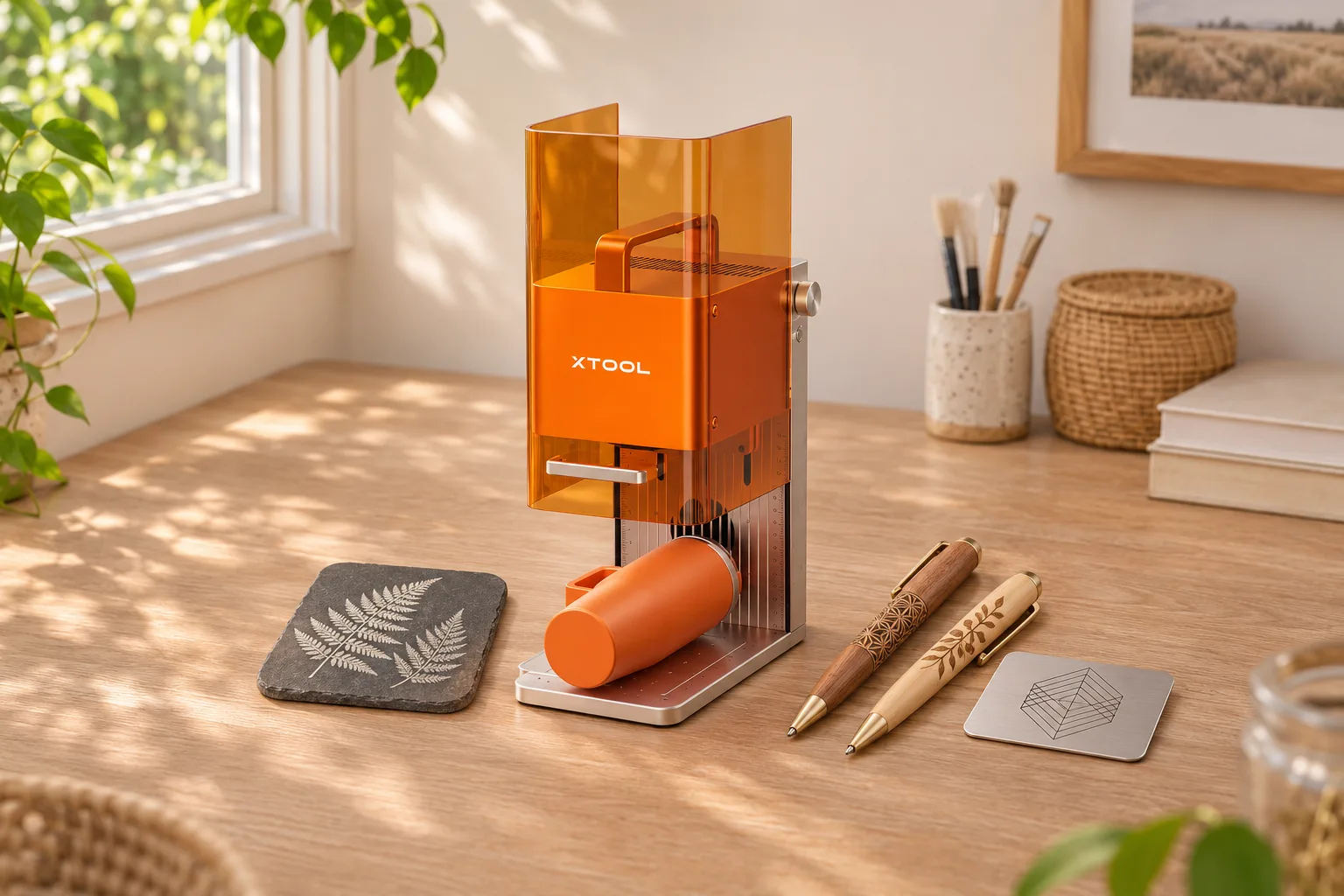
Yes, if you engrave small things fast: keychains, leather patches, wooden tags, metal business cards and tumblers. The F2 is a compact galvo engraver with two lasers, a 15W blue diode for wood and leather and a 5W 1064 nm infrared laser for marking metal, moving at up to 6,000 mm/s. It has a 50MP camera and autofocus, weighs 4.6 kg and works with LightBurn as well as xTool Studio. In November 2026 it was $1,149 at xTool on Black Friday sale (MSRP $1,299), $1,092 at Best Buy and $1,091 at Amazon.
It’s not a cutter. xTool rates it to cut 15 mm basswood and 12 mm acrylic only in multiple passes, and its standard work area is 115 x 115 mm, about 4.5 inches square. For signs and cut-out shapes, buy an enclosed flatbed like the xTool M2. For deep engraving or cutting thin bare metal, buy a fiber laser like the xTool F1 Ultra.
| Spec | xTool F2 (xTool figures) |
|---|---|
| Price (November 2026) | $1,149 at xTool for Black Friday (MSRP $1,299); $1,092 at Best Buy; $1,091 at Amazon |
| Lasers | 15W blue diode + 5W 1064 nm infrared |
| Work area | 115 x 115 mm; 400 x 115 mm with the Slide Extension |
| Speed | 6,000 mm/s (galvo) |
| Cutting | 15 mm basswood, 12 mm acrylic, multiple passes |
| Height and rotary | Objects up to 120 mm high; rotary up to 120 mm diameter |
| Camera and focus | 50MP camera; autofocus and manual focus |
| Safety | Class 4, eye-protecting cover |
| Software | xTool Studio and LightBurn; Wi-Fi, USB, IP |
| Weight and power | 4.6 kg; 150 W max input |
| Warranty | 12 months on main parts |
Is the xTool F1 worth it?
Not new, because you can’t buy it new from xTool anymore. xTool discontinued the F1 and F1 Lite, and its notice says they’ll be removed from xTool’s official stores “at the end of March” (the page doesn’t print the year). The F1’s product page now redirects to xTool’s home page, and xTool’s FAQ calls the F2 “a major upgrade over F1”. By xTool’s own comparison:
| xTool F1 (discontinued) | xTool F2 | |
|---|---|---|
| Blue diode | 10W | 15W |
| Infrared | 2W | 5W (1064 nm) |
| Top speed | 4,000 mm/s | 6,000 mm/s |
| Camera | None | 50MP |
| Software | xTool Studio (xTool Creative Space is frozen at version 2.7) | xTool Studio and LightBurn |
| Accessories | Fits all F1 accessories except the Rolling Hard Case | |
| Price (November 2026) | Not sold new by xTool | $1,149 at xTool, $1,091 at Amazon |
That’s 50% more diode power, 150% more infrared power and 50% more speed (our arithmetic from xTool’s figures), plus a camera, for $1,149. If you’re offered a used F1, weigh it against those numbers and the F2’s 12-month warranty. xTool’s warranty gives refurbished F1 units 6 months.
If you already own an F1, it still runs: xTool Studio supports every xTool machine. xTool Creative Space, the F1’s original software, ended at version 2.7 in June 2025, and new xTool machines, the F2 included, don’t run in XCS at all.
What can the xTool F2 cut and engrave?
It engraves far more than it cuts. The two lasers split the work:
- 15W blue diode: wood, plywood, leather, paper, cork, slate and dark, opaque acrylic, plus coated metal such as powder-coated tumblers. Like every diode, it can’t cut clear acrylic, and blue diodes struggle with light-colored and transparent materials.
- 5W infrared (1064 nm): LightBurn describes near-infrared diodes as “mostly used for engraving some metals”. It’s the F2’s way to mark bare stainless steel and other metals. xTool publishes no metal-cutting figure for the F2.
For metal, the F1 Ultra’s 20W fiber laser goes further: xTool rates it to cut 0.4 mm brass, 0.3 mm stainless steel and 0.2 mm aluminum. For colors on stainless steel and engraving brass and stainless up to 2 mm deep, xTool’s F2 Ultra ($4,799, 60W MOPA plus 40W diode) is the step up.
Never laser PVC or vinyl (including faux leather made with PVC), polycarbonate, ABS, HDPE, foams, fiberglass, coated carbon fiber or PTFE; university safety offices ban them for the fumes they give off or the fires they start. See our laser safety guide.
Is the F2’s work area big enough?
For small goods, yes; for anything bigger than your palm, no. 115 x 115 mm fits a coaster, a business card, a keychain sheet or a patch. Two ways to go bigger:
- Slide Extension: 400 x 115 mm, for long, narrow items.
- Rotary: xTool’s RA3 rotary for the F series is $349 and takes tumblers and cups up to 120 mm across. Our tumbler and glass how-to covers the setup.
The F1 Ultra has 220 x 220 mm, about 3.7 times the area (our arithmetic). If most of your work is over 4.5 inches across, the F2 is the wrong shape.
How much does a complete xTool F2 setup cost?
$1,498 with a rotary, venting out a window, or $1,667 with xTool’s purifier. Our estimates, from xTool’s Black Friday prices on November 27, 2026:
| Item | Price (xTool, November 2026) |
|---|---|
| xTool F2 | $1,149 |
| RA3 rotary | $349 |
| Subtotal, venting out a window | $1,498 |
| Air Purifier Go (for the F2) | $169 |
| Total with purifier | $1,667 |
| Laser safety goggles (optional, see below) | $49 |
Bought at Amazon ($1,091) with xTool’s rotary and purifier, it’s $1,609. Not included: materials, tax, shipping and LightBurn, which you don’t need because xTool Studio runs it. LightBurn is $99 (Core) or $199 (Pro) one-time; check which license LightBurn lists for your machine.
Is the xTool F2 safe?
It’s a Class 4 laser, so treat it like one. The eye-protecting cover blocks the beam in normal use, but it isn’t a Class 1 enclosure. Wear glasses rated for your laser whenever the beam isn’t covered, such as on the rotary or the Slide Extension.
- Glasses: OSHA says laser eyewear must be labeled with its optical density (OD) and the wavelengths it protects against. The F2 has two wavelengths, so you need protection at its blue diode’s wavelength and at 1064 nm, where OSHA lists cataracts and retinal burns as the risk. xTool’s $49 goggles are listed for 316–450 nm and 900–1,080 nm; check the label covers your machine’s exact wavelengths.
- Fumes: engraving makes smoke. Vent outdoors or use a purifier such as the $169 Air Purifier Go.
- Fire: “Never leave an operating laser cutter unattended,” MIT’s safety office says. Keep an extinguisher nearby.
What software does the xTool F2 use?
xTool Studio or LightBurn, your choice. xTool lists LightBurn support for the F2, which matters if you already design in it or run other lasers. LightBurn is $99 for Core or $199 for Pro, one-time with a year of updates, and $40 for each further year of updates; check LightBurn’s compatibility list for which license your machine needs. xTool Studio is xTool’s own software, and xTool’s pages list no subscription to run the F2.
What does xTool’s warranty cover?
12 months on main parts for the F2 series, under xTool’s aftersale policy. xTool names no shorter term for its laser modules; its 6-month “wearing parts” term applies to CO2 laser tubes, which the F2 doesn’t have. Accessories such as tools, materials and lens protectors have no warranty beyond a free replacement if they arrive damaged, and on-site repairs carry a service fee even under warranty.
xTool F2 vs xTool F1 Ultra vs LaserPecker LP5
The F2 is the cheapest of the three and the only one without a fiber laser. Maker figures and November 2026 prices:
| xTool F2 | xTool F1 Ultra | LaserPecker LP5 | |
|---|---|---|---|
| Lasers | 15W diode + 5W IR | 20W diode + 20W fiber | 20W diode + 20W fiber |
| Work area | 115 x 115 mm (400 x 115 with extension) | 220 x 220 mm (220 x 500 with conveyor) | 100 x 100 mm (160 x 300 with extension) |
| Speed | 6,000 mm/s | 10,000 mm/s | 10,000 mm/s |
| Metal cutting (maker) | Not stated | 0.4 mm brass, 0.3 mm stainless, 0.2 mm aluminum | Not published on the pages we read |
| Camera | 50MP, autofocus | 16MP, autofocus | None on the main unit; in the $599 enclosure |
| Safety | Class 4, cover | Class 4, enclosed cover, fire safety stop | Class 1 only with the enclosure |
| Weight | 4.6 kg | 14.7 kg | 6.02 kg with stand and cover |
| LightBurn | Yes | Yes | Yes |
| Price | $1,149 at xTool, $1,091 at Amazon | $2,299 at xTool, $2,173 at Amazon | $2,429.10 at LaserPecker, $2,127 at Amazon |
Buy the F2 if you mainly engrave wood and leather and want to mark metal now and then. Buy the F1 Ultra if metal is the business: true fiber and nearly twice the width each way, for about $1,100 more. The LP5 has the same lasers as the F1 Ultra in a smaller, lighter unit, but the smallest area and no camera without its enclosure; read the LaserPecker LP5 review.
What are the alternatives?
- xTool F1 Ultra ($2,299 at xTool, $2,173 at Amazon): 20W fiber and 20W diode for bare metal, jewelry and tumblers.
- LaserPecker LP5 ($2,127 at Amazon): the same pair of 20W lasers in a portable unit.
- xTool M2 ($499–$1,299): an enclosed Class 1 diode with a 426 x 320 mm bed, if you want to cut wood and acrylic rather than mark metal.
- xTool F2 Ultra ($4,799): 60W MOPA fiber for color on stainless steel.
Compare every pick in the best laser engravers and the best laser engravers for metal. Diode vs CO2 vs fiber explains which laser does what, and the laser engraver cost guide adds up full setups.
Questions people ask
Is the xTool F1 discontinued?
Yes. xTool discontinued the F1 and F1 Lite and says they’ll leave its official stores at the end of March; the F2 replaces them.
What is the difference between the xTool F1 and F2?
By xTool’s figures, the F2 has a 15W diode (vs 10W), a 5W infrared laser (vs 2W), a top speed of 6,000 mm/s (vs 4,000) and a 50MP camera, which the F1 lacked. It fits all F1 accessories except the Rolling Hard Case.
Can the xTool F2 engrave metal?
It marks metal with its 5W infrared laser and engraves coated metal with the diode. xTool doesn’t give a metal-cutting figure for it; for cutting thin metal or deep engraving, buy a fiber laser.
Can the xTool F2 cut wood?
Only thin wood easily. xTool rates it to cut 15 mm basswood and 12 mm acrylic in multiple passes, inside a 115 x 115 mm area.
Does the xTool F2 work with LightBurn?
Yes. xTool lists both xTool Studio and LightBurn for the F2.
Do you need safety glasses with the xTool F2?
It’s a Class 4 laser with an eye-protecting cover. Wear glasses rated for both its wavelengths whenever the beam isn’t covered.
Key specifications
| Feature | xTool F2 | xTool F1 Ultra | LaserPecker LP5 |
|---|---|---|---|
| Type | Portable galvo diode + IR laser | Galvo fiber + diode laser | Portable fiber + diode laser |
| Power | 15W diode + 5W IR | 20W fiber + 20W diode | 20W fiber + 20W diode |
| Work area | 115 x 115 mm | 220 x 220 mm | 100 x 100 mm |
| Safety | Class 4 | Class 4 | Class 1 with enclosure |
| Where to buy | Check price at Amazon | Check price at Amazon | Check price at Amazon |
xTool F2
- Type
- Portable galvo diode + IR laser
- Power
- 15W diode + 5W IR
- Work area
- 115 x 115 mm
- Safety
- Class 4
xTool F1 Ultra
- Type
- Galvo fiber + diode laser
- Power
- 20W fiber + 20W diode
- Work area
- 220 x 220 mm
- Safety
- Class 4
LaserPecker LP5
- Type
- Portable fiber + diode laser
- Power
- 20W fiber + 20W diode
- Work area
- 100 x 100 mm
- Safety
- Class 1 with enclosure
Sources
- xTool F2 5W IR and 15W diode portable dual laser engraver, xtool.com
- xTool F1 and F1 Lite announcement, xtool.com
- xTool F1 Ultra 20W fiber and diode dual laser engraver, xtool.com
- xTool F2 Ultra 60W MOPA and 40W diode dual laser engraver, xtool.com
- xTool store product data (prices and listing dates), xtool.com
- xTool RA3 rotary, xtool.com
- xTool: transition from XCS to xTool Studio, support.xtool.com
- xTool aftersale policies, xtool.com
- xTool laser safety goggles (316–450 nm and 900–1080 nm), xtool.com
- LaserPecker LP5 (US store), us.laserpecker.net
- LightBurn docs: laser types, docs.lightburnsoftware.com
- LightBurn: which license do you need?, lightburnsoftware.com
- OSHA Technical Manual: laser hazards, osha.gov
- MIT EHS: laser cutter safety guidance, ehs.mit.edu
- xTool: fiber vs CO2 vs diode laser, xtool.com
- Best Buy: xTool lasers, bestbuy.com
- xTool F2 on Amazon, amazon.com
Keep exploring

Buying guide
The best color label printers for product labels
The Epson ColorWorks CW-C4000 is the best color label printer for product labels: pigment CMYK ink at up to 1200 dpi, rolls up to 4.25 inches wide, 4 inches a second and BS 5609 certification on Kimdura poly, for $2,499 at CDW in November 2026. Get the Primera LX610 ($2,695) to print and cut custom shapes, or the Primera LX500 ($1,549) on a budget.
Read story
Buying guide
The best edible printers for cakes and cookies
The best edible printer for cakes is a new Canon PIXMA TS702a bought in an edible ink bundle: $295 to $299 in November 2026, for letter and legal-size frosting sheets at about $1 to $3 a cake topper. For printing straight onto cookies, the Primera Eddie is $2,995 and uses about 6¢ of ink per cookie.
Read story