The quick answer
For most events, the best badge printer is a Brother QL label printer such as the QL-800: paper name badges on 62 mm rolls cost about 9¢ each, there's no ink, and check-in apps such as Guest Manager and Gatsby support Brother's networked QL-820NWB ($239.99). For multi-day conferences, staff credentials and photo badges, print PVC cards on the Zebra ZC100: up to 150 color cards an hour for about 43–50¢ each, $873.97 as a package in November 2026. For a small event on a budget, the Evolis Badgy200 ($759) prints PVC badges from a Mac or PC at about 95 an hour.
Our quick picks
Compare the picks
| Feature | Best for paper name badgesBrotherQL-800 | Best PVC badge printer for conferencesZebra ZC100 | Best cheap PVC badge printer for small eventsEvolis Badgy200 |
|---|---|---|---|
| Type | Thermal label printer | Direct-to-card dye-sub ID card printer | Direct-to-card dye-sub ID card printer |
| Media | Brother DK rolls | ||
| Max size | 62 mm labels | ||
| Connection | USB | USB (Ethernet, Wi-Fi optional) | USB |
| Where to buy | Check price at Amazon | Check price at Amazon | Check price at Amazon |
Best for paper name badges
Brother QL-800
- Type
- Thermal label printer
- Media
- Brother DK rolls
- Max size
- 62 mm labels
- Connection
- USB
Best PVC badge printer for conferences
Zebra ZC100
- Type
- Direct-to-card dye-sub ID card printer
- Media
- Max size
- Connection
- USB (Ethernet, Wi-Fi optional)
Best cheap PVC badge printer for small events
Evolis Badgy200
- Type
- Direct-to-card dye-sub ID card printer
- Media
- Max size
- Connection
- USB
01Best for paper name badges
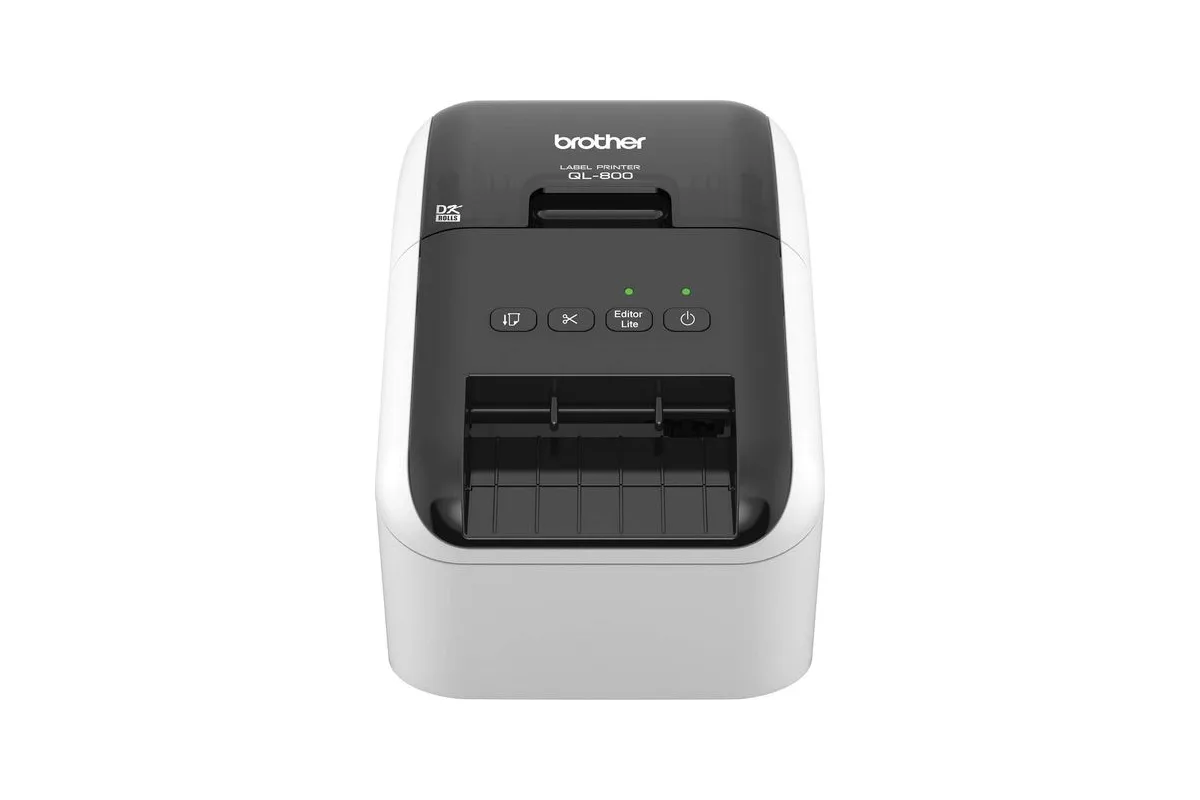
Brother QL-800
A fast desktop label printer for 62 mm DK rolls, printing black and red at 300 dpi from a computer.
A paper label printer is the right badge printer for most one-day events: dinners, meetups, workshops, church and school events, and any walk-in crowd whose names change on the day. The QL-800 prints 62 mm (2.4 inch) DK rolls at 300 dpi with no ink, in black and red on Brother's DK-2251 rolls, so a role like "Speaker" or "Staff" can stand out in red. On Brother's 62 mm x 100 ft DK-2205 continuous roll ($25.99), a 4-inch badge costs about 9¢ (our estimate, about 300 badges a roll); a stick-on name label on DK-1201 address labels is about 3.5¢.
The QL-800 connects by USB only, so it lives next to one laptop. If check-in runs on an app or a tablet, get its sibling, the Brother QL-820NWB ($239.99 at Brother), which adds Wi-Fi, Bluetooth and Ethernet and is the model Guest Manager recommends and the only Brother that Gatsby supports. Its direct thermal labels aren't meant for outdoor or permanent use, which doesn't matter for a one-day badge. Our [label maker guide](/buying-guides/best-label-makers#pick-brother-ql-800) covers the QL-800 for everyday labels.
Good for
- 300 dpi, black and red printing on DK-2251 rolls
- Address labels cost about 3.5¢ each
- No chipped labels or subscriptions
Consider
- USB only; no Wi-Fi
- Thermal labels aren't meant for outdoor or permanent use
02Best PVC badge printer for conferences
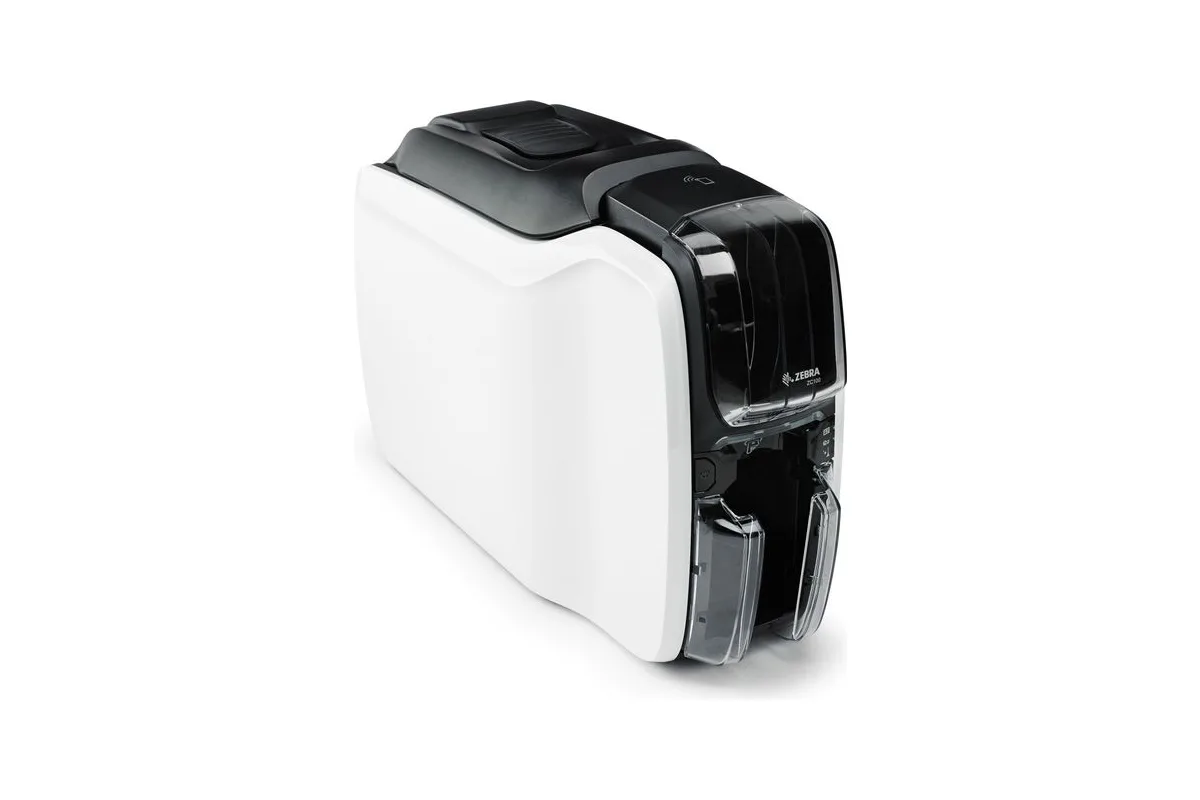
Zebra ZC100
Zebra's entry ID card printer: single-sided 300 dpi color at up to 150 cards an hour, the same 100-card hopper as the ZC300, and a 3-year warranty.
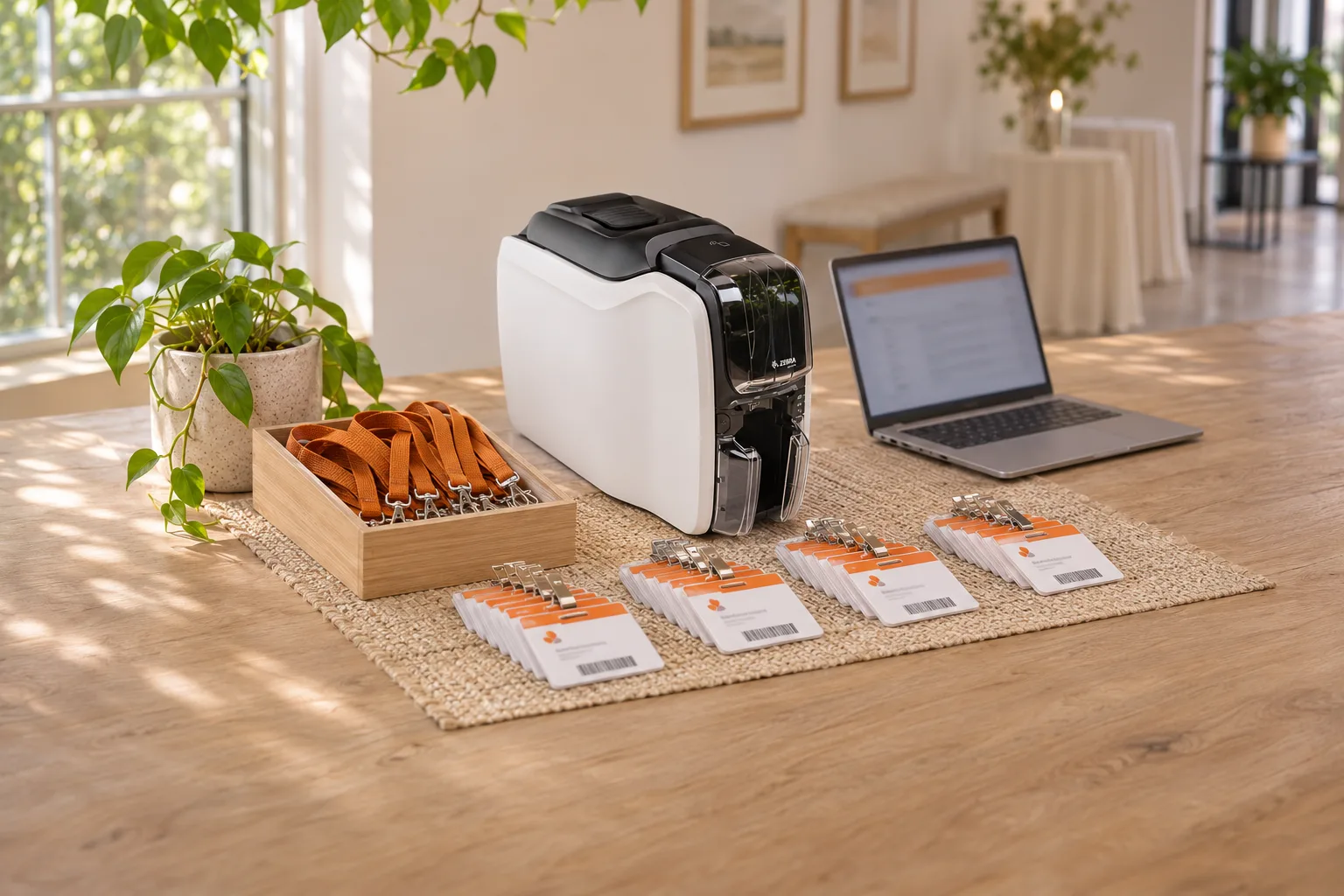
For multi-day conferences, staff and volunteer credentials, season passes and anything with a photo or a scannable barcode that has to survive several days, print on PVC. The ZC100 prints single-sided, edge-to-edge color cards at up to 150 an hour (about 24 seconds each) and black at 700 an hour, from a 100-card hopper into a 100-card stacker. It weighs 8.6 lb, Wi-Fi and Ethernet are options, and the printer and printhead carry a 3-year warranty.
Amazon sells it as a package with cards, ribbon and software for $873.97 in November 2026. Color costs about 35¢ a card in ribbon (Zebra's 200-print roll is $70 at B&H) plus 8–15¢ for the blank card, so about 43–50¢ a badge, plus a holder or lanyard. It's single-sided only, so put the schedule or Wi-Fi details on the front or on a paper insert. Read our [ZC100 review](/reviews/zebra-zc100-review).
Good for
- 150 color or 700 black cards an hour with a 100-card hopper and output
- Windows 11 listed on Zebra's spec page, and cards from 10 to 40 mil
- 3-year printer and printhead warranty; the Amazon listing is a complete package with cards, ribbon and software
Consider
- Single-sided only, with no upgrade to dual-sided
- USB standard; Ethernet and Wi-Fi are options
03Best cheap PVC badge printer for small events
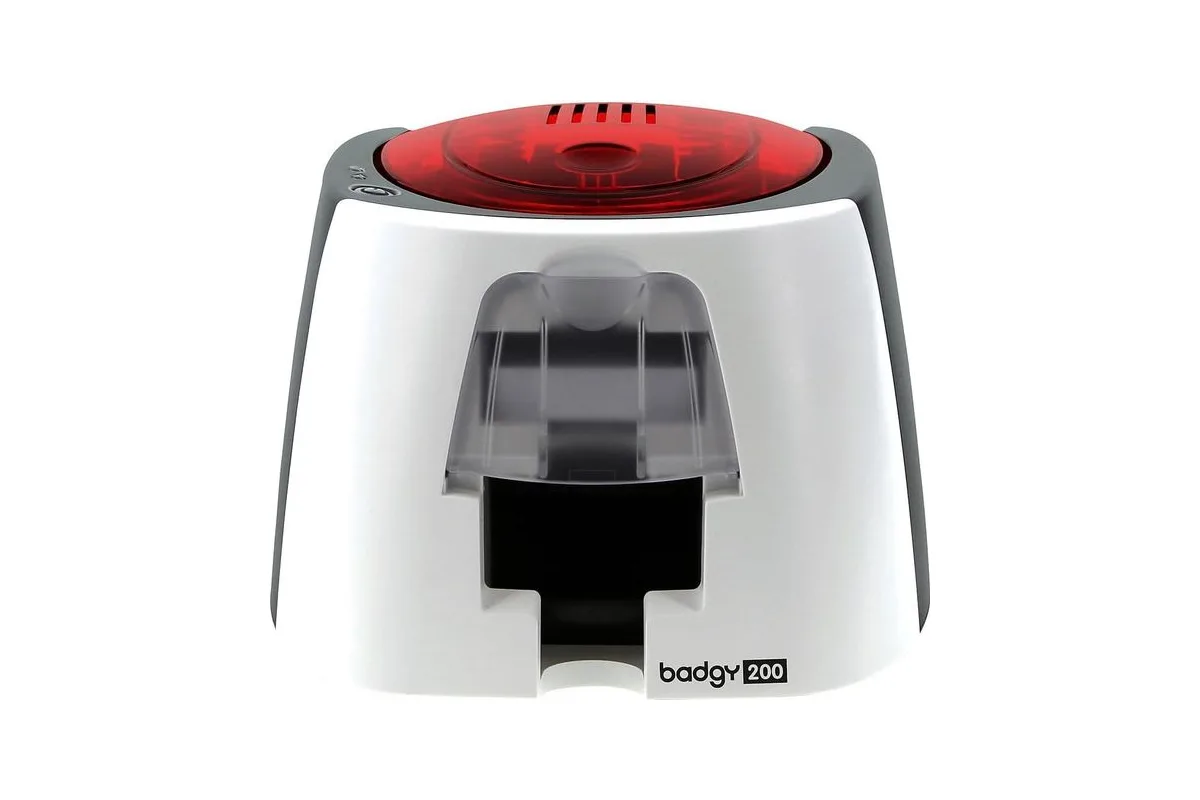
Evolis Badgy200
Evolis's small-volume badge printer: edge-to-edge color cards at up to 95 an hour, with Badge Studio+ software, for about $759.
The Badgy200 is the cheapest way to print PVC badges for a small event, a volunteer team or a club: $759 at Amazon and B&H in November 2026. It's small and light (1.665 kg, about 3.7 lb), prints edge to edge, and comes with Badge Studio+, which imports names from an Excel or CSV file and runs on both Mac and Windows; Evolis's driver chart covers macOS 14 through 26.
It's too slow for check-in at a large event: about 95 color cards an hour, or 38 seconds a card, from a 25- to 40-card feeder. Pre-print the badges the day before instead. Its 100-print ribbon makes color about 47¢ a card, about 55–62¢ with the card. It's USB only, with a 2-year warranty. See [the best ID card printers](/buying-guides/best-id-card-printers#pick-evolis-badgy200) for how it compares with office card printers.
Good for
- The cheapest name-brand color ID card printer here, about $759 at Amazon and B&H
- Prints edge to edge, and Badge Studio+ design software is included
- Works on Mac and Windows
Consider
- Slow at about 95 color cards an hour, with a 25 to 40-card feeder
- 100-print ribbons make color about 47¢ a card, and the warranty is 2 years
How to choose
What you print
Mostly black text suits a mono laser. Color documents and the occasional photo suit an ink tank or inkjet.
Running costs
Compare cost per page rather than cartridge prices. Ink tanks and lasers cost more upfront and far less over time.
Ink and account terms
Check whether the printer blocks third-party ink or toner, or requires an account or subscription to work.
What is the best badge printer for events and conferences?
For most events, a Brother QL label printer. Paper badges on its 62 mm rolls cost about 9¢ each, it needs no ink or ribbon, and event check-in apps are built around it: Guest Manager supports only Brother QL label printers, and Gatsby supports only the QL-820NWB among Brother models. The USB-only QL-800 suits a registration desk with one laptop; the QL-820NWB ($239.99 at Brother) adds Wi-Fi, Bluetooth and Ethernet for tablets and check-in apps.
For badges that last more than a day, carry a photo or get scanned at doors, use a PVC card printer. The Zebra ZC100 prints single-sided color cards at up to 150 an hour for about 43–50¢ each, and it’s $873.97 at Amazon as a package in November 2026.
| Printer | Badge type | Price (Nov 2026) | Speed (maker) | Cost per badge | Connection |
|---|---|---|---|---|---|
| Brother QL-800 | Paper label, black and red | See label maker guide | Not given here | About 9¢ (3.5¢ stick-on) | USB |
| Brother QL-820NWB | Paper label, black and red | $239.99 | Up to 110 address labels/min | About 9¢ | Wi-Fi, Bluetooth, Ethernet, USB |
| Zebra ZC100 | PVC card, color | $873.97 (package) | 150 color cards/hour | About 43–50¢ | USB (Ethernet, Wi-Fi optional) |
| Evolis Badgy200 | PVC card, color | $759 | About 95 color cards/hour | About 55–62¢ | USB |
Cost per badge is our estimate. Paper assumes about 4 inches of Brother’s $25.99, 100-foot DK-2205 roll per badge; PVC is the ribbon price divided by its rated yield plus an 8–15¢ blank card. Holders and lanyards are extra either way. Brother’s speed rating is for small text-only address labels, so badge-length labels take longer.
Should event badges be paper or PVC?
Paper for one-day events, PVC for anything people wear for several days or that needs a photo. Here’s how we’d split it:
| Choose paper labels for | Choose PVC cards for |
|---|---|
| One-day conferences, meetups, dinners and workshops | Multi-day conferences and festivals |
| Large walk-in crowds and same-day registrations | Staff, volunteer, vendor and press credentials |
| Name changes at the desk | Photo badges and season or membership passes |
| Budgets measured in cents per attendee | Badges with a barcode scanned at doors on several days |
| Check-in apps on tablets | Reusable badges collected and reissued |
Gatsby, an event check-in platform, draws the line the same way: it suggests Brother labels for executive dinners, roadshows and internal meetings, where the printer costs roughly $200 to $300 and no rental is needed, and Zebra card stock for conferences, investor summits and branded events, where the badge is part of the branding and you may need to rent a printer.
How much does an event badge cost to print?
About 3.5¢ to 9¢ on paper and 43¢ to 62¢ on PVC, before holders and lanyards. Ordering personalized cards from a print service costs several times more. Our estimate for 500 attendees:
| Option | Per badge | 500 badges |
|---|---|---|
| Brother QL, stick-on name label (DK-1201) | About 3.5¢ | About $18 |
| Brother QL, 4-inch badge on DK-2205 | About 9¢ | About $45 |
| Zebra ZC100, full-color PVC | About 43–50¢ | About $215–$250 |
| Evolis Badgy200, full-color PVC | About 55–62¢ | About $275–$310 |
| Watkins Printing, personalized PVC | $2.90 | $1,451.04 |
| IDCoast, personalized PVC (250 or more) | $5 | $2,500 |
In-house figures are supplies only, not the printer. Against Watkins’s $2.90 a card, the $873.97 ZC100 package pays for itself after about 360 personalized badges, and the $759 Badgy200 after about 330 (our estimates). If you run one conference a year with a few hundred attendees, a PVC printer pays off in the first or second year. For a single event, ordering may be simpler. Our ID card printer cost guide has more break-even math.
How fast can you print badges at check-in?
Fast enough on paper; slowly on PVC. Zebra rates the ZC100 at 150 color cards an hour, about 24 seconds a card, and Evolis rates the Badgy200 at about 95 an hour, 38 seconds a card. A 300-person conference is about 2 hours of printing on the ZC100 or about 3 hours on the Badgy200 (our estimate), far too slow if everyone arrives at 8:30.
Three ways around it:
- Pre-print PVC badges the day before for registered attendees, and use a label printer at the desk for walk-ins and corrections.
- Pre-print the color design and personalize in black. Order cards printed with the event artwork (print shops charge about $1.64 a card for 500 identical cards), then print names in black on the ZC100, which Zebra rates at 700 cards an hour. Black ribbons cost about 1.5–3¢ a card. This costs more per badge than printing full color yourself, but it’s about four to five times faster at the desk.
- Add printers. Two ZC100s halve the queue, and the Brother QL-820NWB can sit at each check-in tablet.
Which badge printers work with event check-in apps?
Brother QL label printers, mostly. Guest Manager supports only Brother QL label printers, recommends the QL-820NWB, and says non-Brother printers (Zebra, Dymo) aren’t supported; it uses 62 mm DK-2205 rolls or 60 x 86 mm DK-1234 labels. Gatsby supports only the QL-820NWB among Brother printers, plus Zebra card printers with Bluetooth. Check your app’s printer list before you buy; the USB-only QL-800 is for printing from a laptop’s own badge template.
How many ribbons and labels does an event need?
Work it out from the rated yields, then bring a spare. For 500 attendees (our estimates):
| Printer | Supply | Rated yield | For 500 badges | Cost |
|---|---|---|---|---|
| Brother QL | DK-2205 62 mm x 100 ft roll, $25.99 | About 300 four-inch badges | 2 rolls | About $52 |
| Zebra ZC100 | YMCKO color ribbon, $70 at B&H | 200 cards | 3 ribbons | $210, plus cards |
| Evolis Badgy200 | YMCKO color ribbon, $46.90 at B&H | 100 cards | 5 ribbons | $234.50, plus cards |
Blank 30 mil PVC cards cost about 8–15¢ each ($39.99 for 500 from Bodno). The holder or lanyard often costs more than the badge: IDCoast, for example, charges $1.50 for a holder and $4 for a lanyard added to an order, and slot-punching a card for a clip is 25¢ to 60¢ a card from print services.
Clean the card printer before the event. Zebra puts a cleaning roller in every ribbon and sells cleaning-card kits ($26.50 for five cards, each rated for 1,000 images), and Badgy recommends cleaning its printers once a year, more often in a dusty room or with heavy use. Dust on cards shows up as white spots, and debris under the printhead can damage it for good. Our maintenance guide has the steps.
Which badge printer works with a Mac at the registration desk?
The Brother QL-820NWB, which Brother lists as Windows and Mac compatible, for paper badges, and the Evolis Badgy200 for PVC: Evolis’s driver chart covers macOS 14 through 26 on Intel and Apple Silicon, and Badge Studio+ runs on a Mac. Zebra’s Mac driver for the ZC series doesn’t list the macOS versions it supports, so test the ZC100 with your laptops before the event, or run it from a Windows PC.
What is the best badge printer for a one-day event?
A Brother QL printer: the QL-800 if you print from one laptop, the QL-820NWB if check-in runs on tablets or an app. At about 9¢ a badge, a 500-person event costs about $45 in labels. Print “Speaker”, “Staff” or “Sponsor” in red on Brother’s DK-2251 black-and-red roll to tell people apart at a glance.
What is the best badge printer for multi-day conferences and staff credentials?
The Zebra ZC100. PVC cards survive several days in a lanyard, take a photo and a barcode, and can be collected and reused. Edge-to-edge color at 150 cards an hour from a 100-card hopper handles a few hundred credentials comfortably if you print them ahead. For reusable badges, Evolis’s Zenius 2 and Primacy 2 print rewritable cards that can be erased and reprinted; Evolis suggests them for visitor badges and temporary cards. See the best ID card printers for both.
For a volunteer team or a small festival printing under a couple of hundred badges, the Evolis Badgy200 ($759) does the same job more slowly and works from a Mac.
How we chose
We compared paper label printers and PVC card printers for event badges on the makers’ own specifications and prices, ribbon, card and label prices, and the printer lists that event check-in apps publish, all checked on November 27, 2026. Costs per badge and break-even figures are our arithmetic. We haven’t tested these printers ourselves; see how we score.
Also consider
- Brother QL-820NWB: the networked sibling of the QL-800, $239.99 at Brother, and the printer check-in apps are built around.
- Zebra ZC300: dual-sided PVC badges with the schedule on the back, 140 cards an hour dual-sided, $1,999.99. See our ZC300 review.
- Large-format badges: InstantCard sells large-format event badges as a service, and Zebra’s ZC10L prints cards about 3.5 x 5.5 inches, though it’s $5,654 at ID Security Online and Zebra’s plans for it are unclear.
- Labels and stickers: for sponsor stickers and swag, see the best sticker printers; for shipping materials to a venue, the best shipping label printers.
Questions people ask
How many badges does a label roll print?
About 300 four-inch badges from Brother’s 100-foot DK-2205 roll ($25.99), by our estimate; shorter badges stretch it further. Brother’s DK-1201 address labels make small stick-on name tags for about 3.5¢ each.
What size is a PVC event badge?
The standard CR80 card, 3.375 x 2.125 inches (85.6 x 54 mm), usually 30 mil thick. Every card printer here takes it.
Do I need software to print event badges?
Not for paper labels if your check-in app prints them. For PVC, the Badgy200 includes Badge Studio+, which imports attendee lists from Excel or CSV, and the ZC100’s Amazon package includes software. You can also design in any app and print through the card printer’s driver.
Is it worth renting a badge printer for one event?
Often, for PVC. A card printer costs $759 or more, and against print-service prices it takes about 330 to 360 personalized badges to pay back. A label printer costs far less and is usually worth buying.
Can a badge printer print a QR code or barcode?
Yes, if your badge software or check-in app puts one in the design; the printer prints it like any other image. On a PVC card printer, barcodes print best in the black resin panel, which Zebra recommends for barcodes and text.
Sources
- Brother QL-820NWB, Brother
- Brother DK-2205 continuous paper label roll, Brother
- Brother QL-800 at Amazon, amazon.com
- Guest Manager supported printers, guestmanager.com
- Gatsby badge printing, help.gatsby.events
- Zebra ZC100 specifications, zebra.com
- B&H Zebra ZC100 listings, bhphotovideo.com
- Badgy printers, badgy.com
- Badgy software, us.badgy.com
- Evolis Badgy200 specification sheet, us.evolis.com
- B&H Evolis Badgy listings, bhphotovideo.com
- Evolis drivers compatibility chart, us.evolis.com
- Badgy consumables and accessories, us.badgy.com
- Zebra ZC300 series ribbons and cleaning kits (ID Wholesaler), idwholesaler.com
- Evolis Zenius 2, us.evolis.com
- Zebra ZC300 Series specifications, zebra.com
- Bodno CR80 30 mil PVC cards, bodno.com
- Watkins Printing plastic ID cards, printwatkins.com
- IDCoast ID cards, idcoast.com
- InstantCard pricing, instantcard.net
Keep exploring

Buying guide
The best barcode label printers
The Zebra ZD421 is the best barcode label printer for most businesses: 4-inch labels at 6 inches a second, any brand of label roll and a 24-month warranty, for about $480 to $526 in November 2026. Get the Brother QL-820NWBc ($229.99) for an office or shop counter, and a thermal transfer model for inventory labels that have to last.
Read story
Buying guide
The best check printers for a small business
The TROY 3001dw ($509.15 at TROY, $530 at Amazon in November 2026) is the best check printer for a small business: a 35 ppm Wi-Fi laser with MICR toner, rated for 350 to 2,500 checks a month, at about 5¢ to 7¢ per check three to a page by our estimate. Get the TROY 4001dn for a locking tray, or the VersaCheck M15 MXD ($399.99) for software in the box.
Read story